Send Me Email Test: Essential Guide for Small Businesses
March 23, 2026
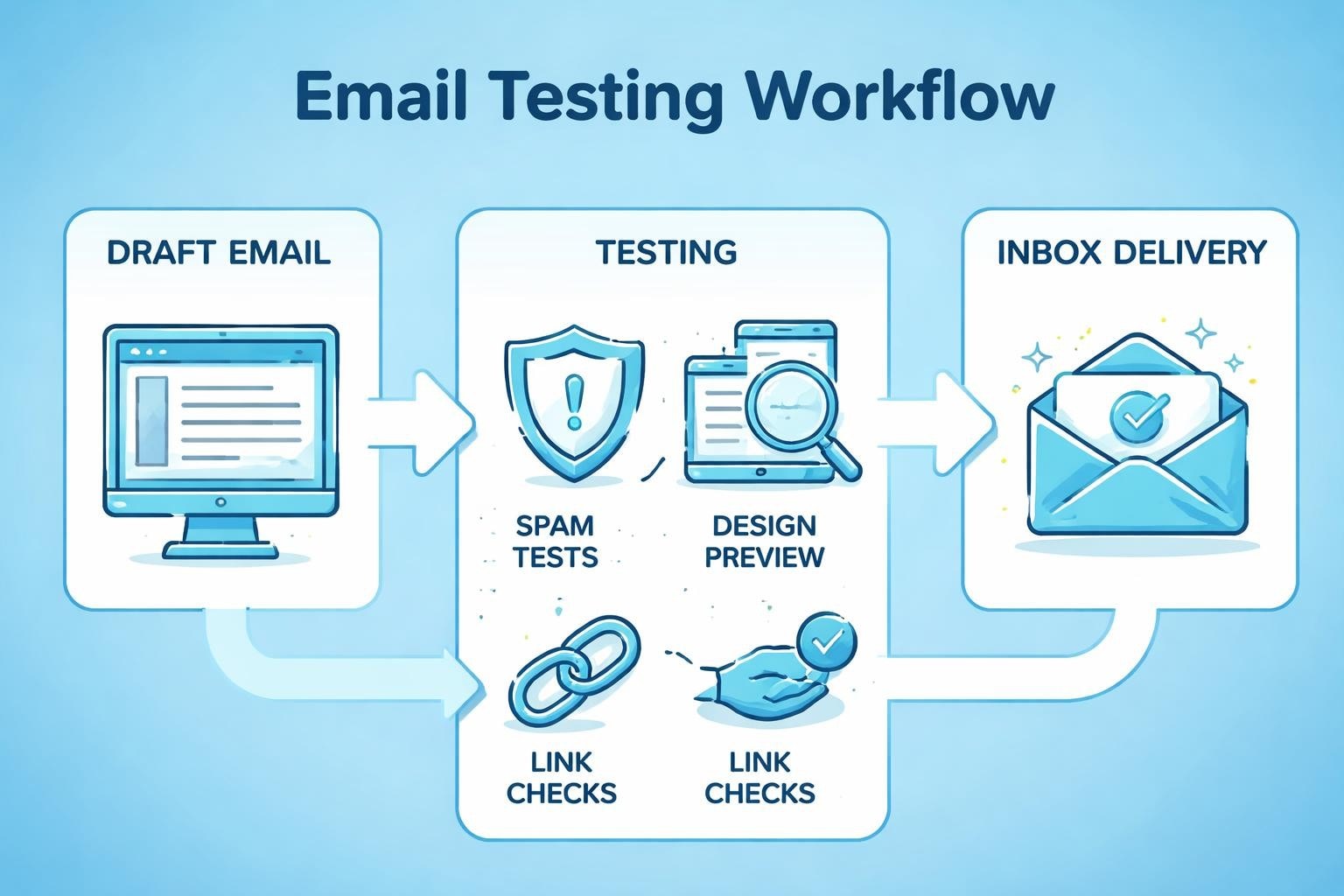
Email marketing remains one of the most powerful tools for small businesses, but your carefully crafted campaigns mean nothing if they don't reach your audience's inbox correctly. Before launching any email campaign, savvy marketers send me email test versions to themselves and colleagues to catch errors, verify formatting, and ensure deliverability. This critical quality control step can make the difference between a successful campaign and a costly mistake that damages your brand reputation.
Why Testing Email Campaigns Is Non-Negotiable
Every email marketing platform allows users to send me email test messages, yet many small business owners skip this crucial step in their rush to launch campaigns. The consequences can be severe: broken links, formatting disasters on mobile devices, images that don't load, or messages that land directly in spam folders.
When you send me email test versions before broadcasting to your entire list, you create an opportunity to catch mistakes that could otherwise cost you subscribers and revenue. A single spelling error in a subject line or a broken checkout link can undermine months of relationship building with your audience.
The True Cost of Skipping Email Tests
Small businesses operating on tight margins cannot afford the reputational damage that comes from poorly tested emails. Consider these real-world scenarios:
- Broken promotional codes that frustrate customers and overwhelm support teams
- Mobile rendering issues that make content unreadable on smartphones (where 60% of emails are opened)
- Spam trigger words that send your message to junk folders
- Personalization tokens that display as raw code instead of customer names
- Missing or incorrect links that send traffic to 404 pages
The importance of comprehensive email testing extends beyond simple proofreading. It encompasses technical validation, cross-client compatibility, and deliverability optimization.
Essential Email Testing Methods Every Marketer Should Use
Understanding how to properly send me email test campaigns involves multiple testing layers. Each serves a distinct purpose in your quality assurance workflow.
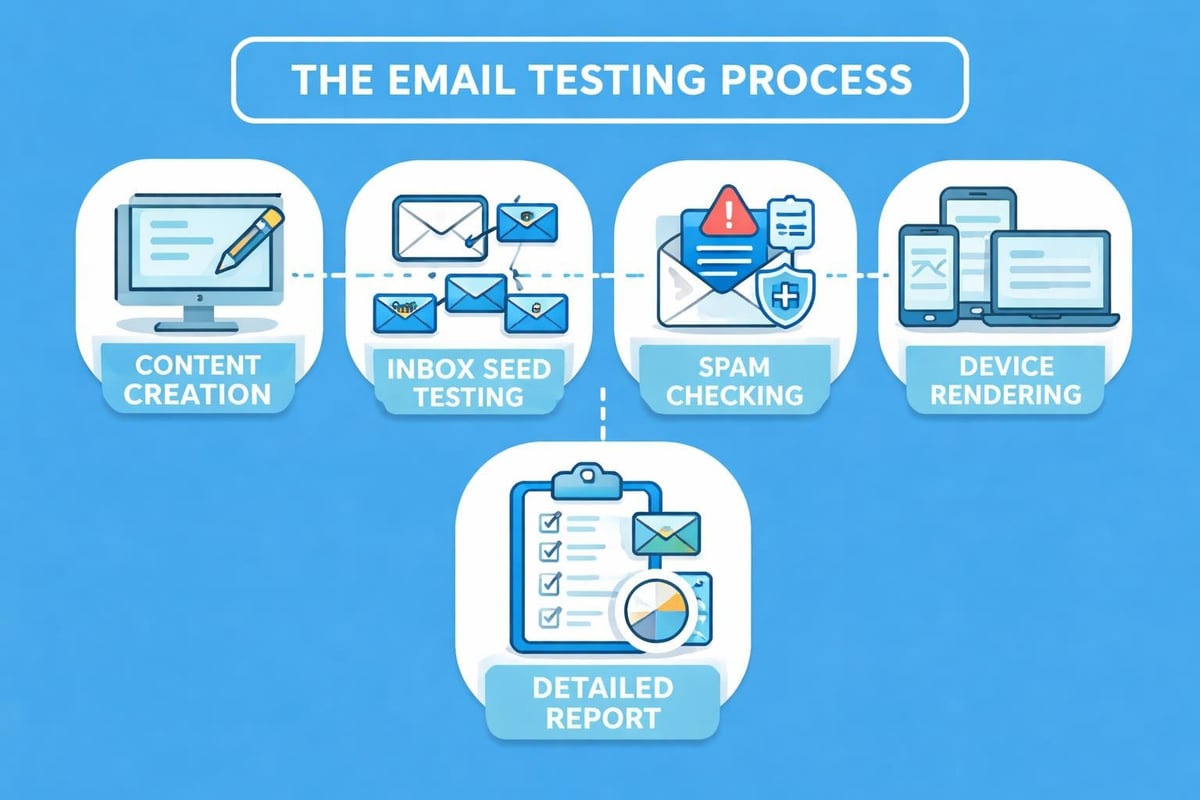
Inbox Preview Testing
Start by sending yourself test emails across different email clients. The way Gmail renders HTML can differ significantly from Outlook or Apple Mail. What looks perfect in one client may appear broken in another.
Critical clients to test:
- Gmail (desktop and mobile app)
- Outlook (various versions)
- Apple Mail (iOS and macOS)
- Yahoo Mail
- Samsung Email
Many small businesses benefit from understanding how different email clients handle messages to optimize their campaigns accordingly.
Device and Screen Size Testing
Send me email test messages to multiple devices you actually own. Open them on your smartphone, tablet, and desktop computer. Check both portrait and landscape orientations on mobile devices.
| Device Type | Key Testing Points | Common Issues |
|---|---|---|
| Smartphone | Touch targets, font sizes, single column layout | Text too small, buttons too close together |
| Tablet | Mixed layouts, orientation changes | Inconsistent rendering between modes |
| Desktop | Multi-column layouts, hover states | Over-optimization for mobile |
Spam Filter Testing
Before you send me email test campaigns to real subscribers, verify they won't trigger spam filters. Several factors influence spam scores:
- Subject line content - Avoid excessive capitalization and spam trigger words
- Sender authentication - Implement SPF, DKIM, and DMARC records
- Content balance - Maintain healthy text-to-image ratios
- Link quality - Ensure all URLs are legitimate and functional
- List hygiene - Remove inactive subscribers regularly
The email testing best practices outlined by PowerDMARC provide comprehensive guidance on avoiding spam filters whilst maintaining engaging content.
Setting Up Your Email Testing Workflow
Establishing a systematic approach when you send me email test versions ensures nothing falls through the cracks. Create a testing checklist that becomes part of your standard operating procedure.
Pre-Send Testing Checklist
Before distributing any campaign, work through these verification steps:
Content verification:
- Subject line spelling and character count (under 50 characters optimal)
- Preview text optimization
- Body copy proofreading
- Personalization tokens rendering correctly
- Call-to-action clarity and prominence
Technical validation:
- All links functional and pointing to correct destinations
- Images loading properly with appropriate alt text
- Unsubscribe link present and working
- Physical mailing address included (legal requirement)
- Mobile responsiveness confirmed
Design quality:
- Brand consistency (colours, fonts, logos)
- Proper hierarchy and readability
- Whitespace and visual balance
- Loading time acceptable
When you send out emails through a quality platform, many of these elements are streamlined, but manual verification remains essential.
Creating Test Seed Lists
Send me email test campaigns to curated seed lists containing various email addresses across different providers. This approach reveals how your message appears in different environments.
Recommended seed list structure:
- Personal accounts on major providers (Gmail, Outlook, Yahoo)
- Business email addresses on corporate servers
- Team members across different departments
- Dedicated testing accounts with various spam settings
- Mobile-only email addresses
Rotate through these addresses systematically to ensure comprehensive coverage without overwhelming any single inbox.
Advanced Email Testing Techniques
Beyond basic send me email test procedures, sophisticated marketers employ advanced techniques to optimize campaign performance.
A/B Split Testing Strategy
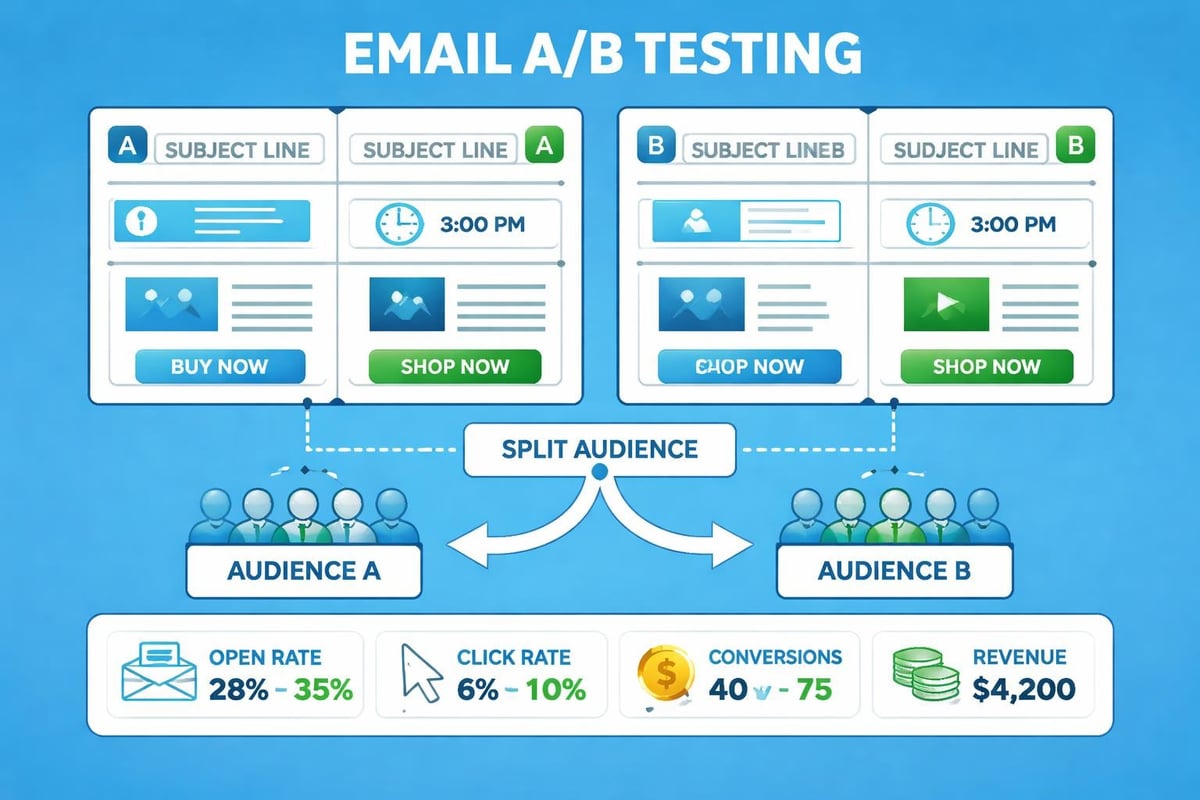
Implementing email A/B testing best practices allows you to make data-driven decisions rather than relying on assumptions. When you send me email test variations to segments of your audience, you discover what truly resonates.
Elements to A/B test:
- Subject lines (emoji vs. no emoji, question vs. statement)
- Send times (morning vs. evening, weekday vs. weekend)
- Call-to-action wording ("Shop Now" vs. "Discover More")
- Email length (concise vs. detailed)
- Visual layouts (image-heavy vs. text-focused)
Test only one variable at a time to isolate what drives performance changes. Split your audience evenly and ensure your sample size is statistically significant before drawing conclusions.
Template Testing Across Updates
Email clients frequently update their rendering engines, which can break previously functional templates. Regular email template testing prevents unexpected surprises when client updates roll out.
Schedule quarterly template audits where you send me email test messages using your standard templates to verify they still render correctly across all major clients.
Tools and Resources for Email Testing
Whilst manual testing remains important, specialized tools accelerate the process and catch issues human eyes might miss.
Email Testing Platforms
Professional email testing platforms provide comprehensive previews across dozens of email clients and devices simultaneously. Rather than manually sending yourself tests to multiple accounts, these services generate previews instantly.
Key features to look for:
- Multi-client rendering previews
- Spam score analysis
- Link validation
- HTML code validation
- Accessibility checking
Native Platform Testing Features
Most email marketing platforms, including solutions designed for email marketing for small businesses, include built-in testing capabilities. These typically allow you to send me email test versions to specified addresses before scheduling your campaign.
Familiarize yourself with your platform's testing options:
| Feature | Benefit | When to Use |
|---|---|---|
| Preview Mode | See rendered email without sending | Every campaign during design |
| Test Send | Deliver to specific addresses | Before every campaign launch |
| Inbox Seed Testing | Check deliverability across providers | Weekly for templates, always for new designs |
| Link Checker | Verify all URLs | Before every send |
Manual HTML Validation
For custom-coded email templates, validating HTML code ensures compatibility across email clients. Email HTML differs significantly from web HTML, with limited CSS support and outdated rendering engines in some clients.
Common HTML issues to check:
- Inline CSS instead of external stylesheets
- Table-based layouts for maximum compatibility
- Absolute image URLs rather than relative paths
- Fallback fonts for unsupported custom typefaces
Testing for Specific Email Campaign Types
Different campaign types require tailored testing approaches. When you send me email test messages, adjust your focus based on the email's purpose.
Promotional Campaigns
Promotional emails featuring discounts or special offers demand rigorous testing of:
- Coupon code functionality
- Time-sensitive messaging accuracy
- Product links to correct inventory
- Pricing consistency across email and landing pages
- Urgency elements (countdown timers, stock indicators)
Transactional Emails
Order confirmations, shipping notifications, and password resets require flawless functionality since they're triggered by customer actions.
Testing priorities for transactional emails:
- Dynamic content population (order details, tracking numbers)
- Personalization accuracy
- Immediate delivery speed
- Mobile optimization (most checked on smartphones)
- Clear next-step instructions
Newsletter Campaigns
Regular newsletters benefit from template consistency testing. After you establish a working template, send me email test versions monthly to confirm ongoing compatibility, even if content changes.
Measuring Email Testing Success
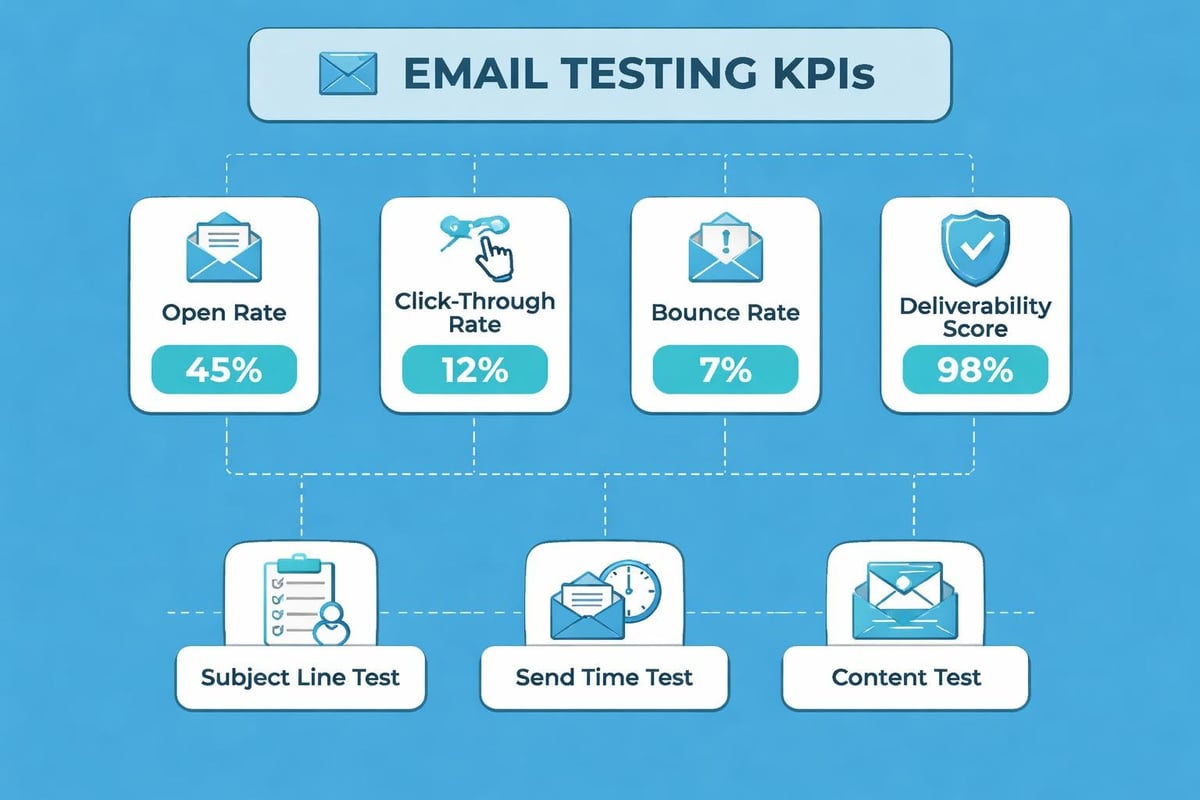
Testing isn't just about avoiding mistakes; it's about continuously improving performance. Track metrics that reveal how your testing efforts translate to better results.
Key Performance Indicators
Monitor these metrics before and after implementing rigorous testing protocols:
- Deliverability rate - Percentage reaching inboxes vs. spam
- Open rate - Subject line and sender name effectiveness
- Click-through rate - Content and CTA performance
- Conversion rate - Ultimate campaign success measure
- Unsubscribe rate - Content relevance and frequency appropriateness
- Bounce rate - List quality and technical configuration
Testing Impact Analysis
Quantify how send me email test procedures affect your bottom line. Compare campaign performance from before and after implementing systematic testing:
Before comprehensive testing:
- Average open rate: 18%
- Click-through rate: 2.1%
- Conversion rate: 0.8%
- Customer complaints: 12 per campaign
After comprehensive testing:
- Average open rate: 24%
- Click-through rate: 3.7%
- Conversion rate: 1.6%
- Customer complaints: 2 per campaign
This data demonstrates clear ROI on time invested in testing procedures. Small businesses can leverage the SaaS email marketing playbook to establish these testing frameworks efficiently.
Common Email Testing Mistakes to Avoid
Even experienced marketers make testing errors that undermine their quality control efforts. Recognize these pitfalls to avoid them.
Testing Only in Your Preferred Email Client
Just because your email looks perfect in Gmail doesn't guarantee success across all platforms. Outlook, particularly older versions, renders HTML differently than modern clients. Always send me email test messages to diverse clients.
Ignoring Mobile Testing
Desktop testing alone misses the majority of your audience. Over 60% of email opens occur on mobile devices. If your email isn't mobile-optimized, you're essentially ignoring most recipients.
Testing at the Wrong Time
Send me email test campaigns at the same time of day you plan to send to your full list. Email server loads, internet speeds, and even spam filter algorithms can vary by time of day.
Skipping Link Testing
Clicking every single link in your test email seems tedious, but broken links are among the most common and most damaging email errors. One broken checkout link can cost hundreds or thousands in lost revenue.
Not Testing Unsubscribe Functionality
The unsubscribe process must work flawlessly. A broken unsubscribe link frustrates customers and may violate regulations like GDPR and CAN-SPAM. Test it every time.
Building a Culture of Email Quality
For organizations with multiple team members creating emails, establishing testing standards ensures consistency regardless of who sends campaigns.
Documentation and Training
Create written procedures documenting how to send me email test messages properly. Include:
- Step-by-step testing checklists
- Screenshot examples of correct rendering
- Common error examples and fixes
- Escalation procedures for technical issues
- Approval workflows before campaign launch
Quality Gates and Approvals
Implement approval requirements where campaigns cannot be sent without passing defined quality gates. This might include:
- Creator completes initial testing and submits for review
- Secondary team member sends me email test to their accounts
- Manager provides final approval
- System verification of required elements (unsubscribe link, physical address)
- Automated pre-send checks for broken links and spam score
This multi-layer approach catches errors individual testing might miss. Understanding email testing methods and elements helps teams develop robust procedures.
Future-Proofing Your Email Testing
Email technology continues evolving, requiring ongoing adaptation of testing procedures. Stay ahead of changes to maintain campaign effectiveness.
Emerging Email Technologies
New email capabilities require updated testing approaches:
- AMP for Email - Interactive elements within emails
- Dark mode optimization - Ensuring readability in dark themes
- Advanced personalization - Dynamic content blocks based on behavior
- AI-powered send time optimization - Individualized delivery timing
As you adopt these technologies, expand what you verify when you send me email test versions to include these new elements.
Continuous Learning and Improvement
Email marketing best practices evolve constantly. Dedicate time to:
- Reviewing industry research on email trends
- Analyzing your own campaign performance data
- Testing new approaches in controlled A/B tests
- Sharing learnings across your team
- Updating testing protocols based on new insights
The best practices for email testing shared by Podium emphasize ongoing education and adaptation to changing recipient expectations.
Implementing thorough email testing procedures transforms campaign performance from inconsistent to reliably effective. When you commit to sending yourself test emails before every campaign launch, you protect your sender reputation, improve subscriber engagement, and maximize marketing ROI. Astonish Email provides small businesses with the tools and features needed to test campaigns comprehensively, ensuring every message reaches inboxes looking professional and performing optimally.