One Time Email: Privacy Protection for Small Businesses
April 01, 2026
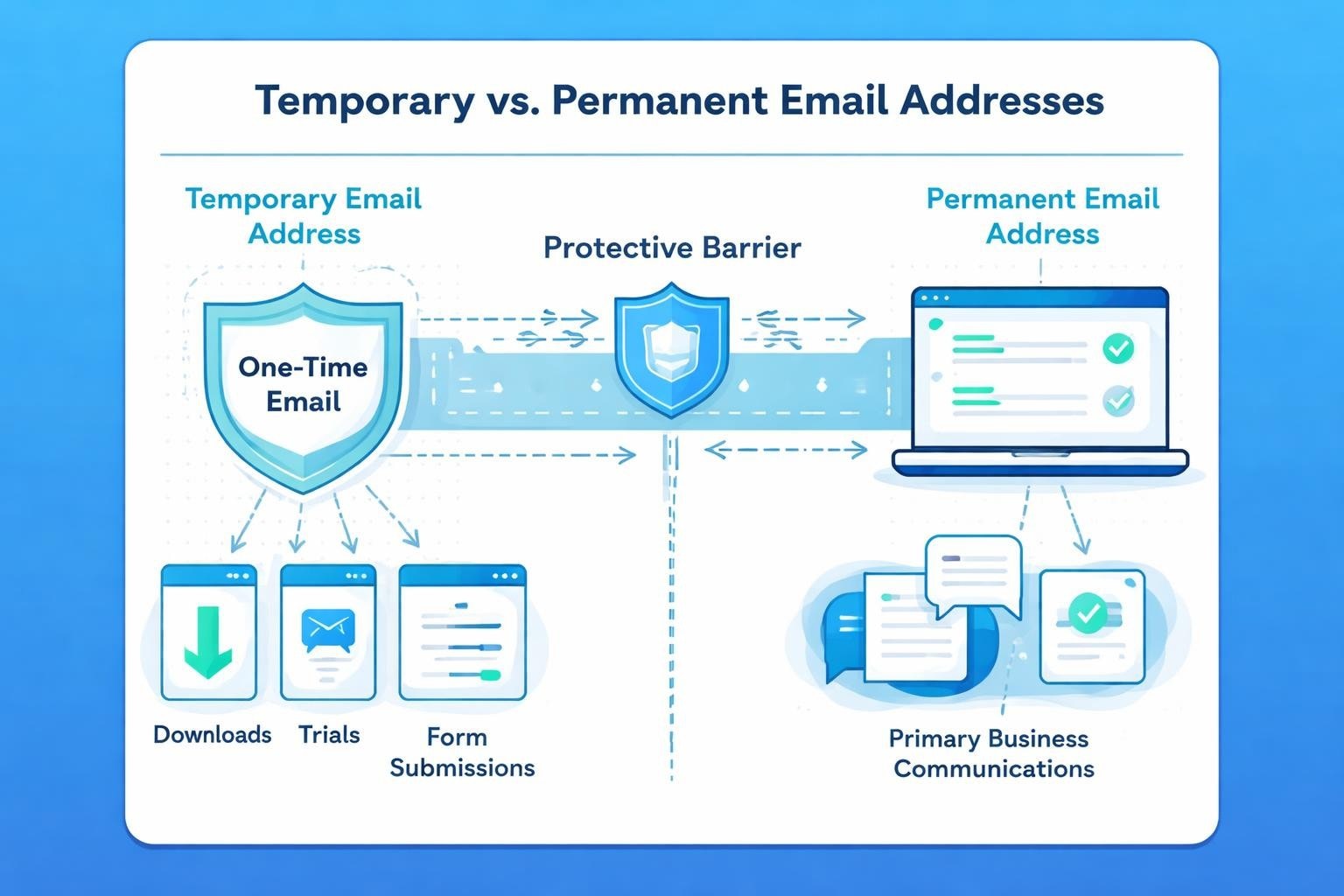
In today's digital landscape, businesses face constant pressure to share email addresses for everything from software trials to webinar registrations. A one time email provides an elegant solution to this modern challenge, offering temporary email addresses that protect your primary inbox whilst allowing you to access necessary services and content. For small business owners managing marketing communications, understanding how to leverage these disposable addresses can significantly enhance both privacy and productivity.
What Is a One Time Email and How Does It Work
A one time email is a temporary email address designed for single-use or short-term purposes. Unlike your permanent business email, these addresses expire after a set period or after completing their intended function. Disposable email addresses serve as buffers between your primary email and the countless online services requesting contact information.
The Technical Foundation
These temporary addresses function through several mechanisms. Some services generate random email addresses that forward messages to your real inbox for a limited time. Others create completely self-contained inboxes that exist independently, requiring no connection to your primary email account.
Most one time email services operate on straightforward principles:
- Auto-generation: The system creates a unique address instantly
- Time-limited validity: Addresses expire after minutes, hours, or days
- No registration required: Many services need no account creation
- Forwarding capabilities: Selected services can route messages to your real inbox
- Self-destruction: Messages and addresses delete automatically
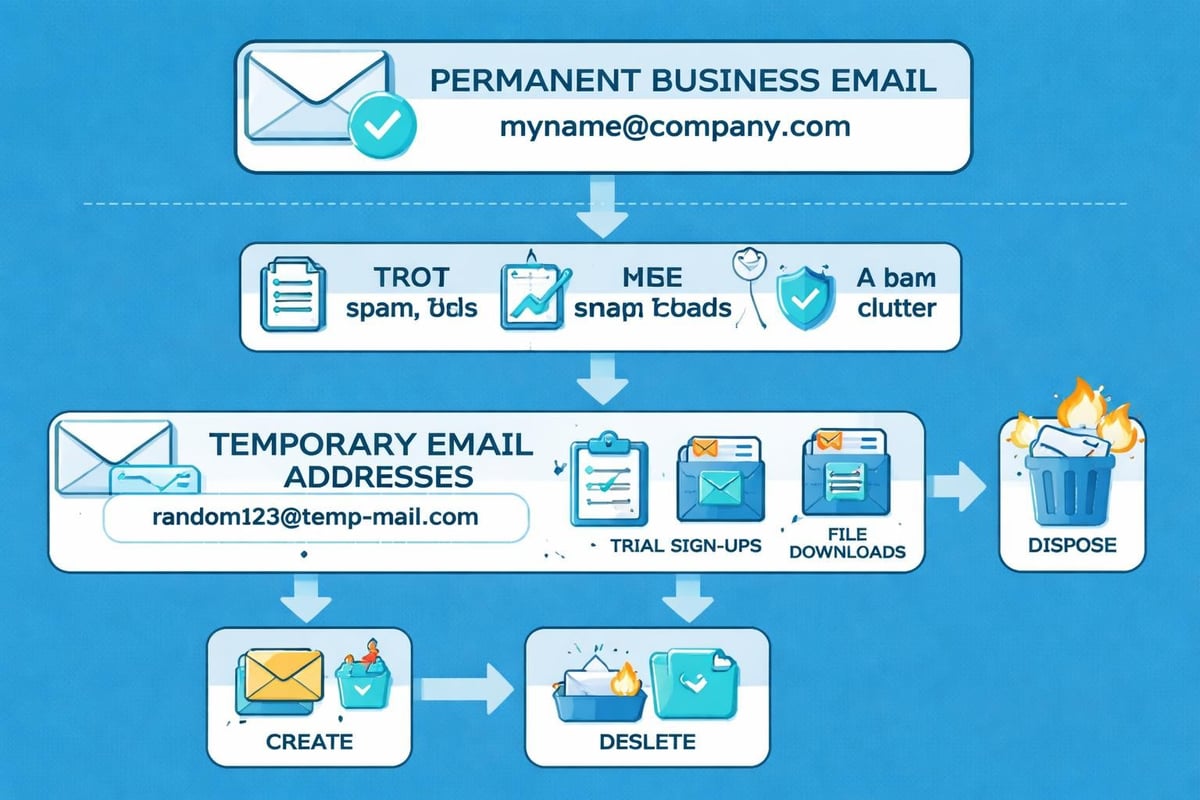
The technology behind these services varies considerably. Some providers host their own mail servers, whilst others partner with existing email infrastructure. Advanced platforms offer API integration, allowing businesses to programmatically generate disposable addresses for testing or customer service purposes.
Why Small Businesses Need One Time Email Addresses
Privacy concerns continue escalating in 2026, with data breaches and spam becoming increasingly sophisticated. Small businesses face unique vulnerabilities because they often lack dedicated IT security teams. A one time email strategy addresses multiple business pain points simultaneously.
Protection Against Data Harvesting
When you sign up for industry newsletters, download whitepapers, or register for webinars, your email address enters databases that may be sold or compromised. Using temporary addresses for these interactions keeps your professional email secure.
Key benefits for business protection include:
- Preventing email list sales to third parties
- Reducing exposure in potential data breaches
- Maintaining control over communication channels
- Testing new services without commitment
- Avoiding permanent marketing lists
Managing Spam and Inbox Clutter
The average small business owner receives over 120 emails daily. A significant portion consists of unwanted marketing messages from services used once months ago. One time email addresses eliminate this problem entirely.
| Problem | Traditional Email | One Time Email |
|---|---|---|
| Spam accumulation | Continuous growth | Zero long-term impact |
| Unsubscribe effort | Required for each sender | Unnecessary |
| Inbox organisation | Constant filtering needed | Automatic separation |
| Privacy risk | Permanent exposure | Temporary only |
When testing new marketing tools or signing up for competitive research, temporary addresses ensure these exploratory activities don't compromise your primary communications. This approach aligns perfectly with email marketing best practices for small businesses.
Popular One Time Email Service Options
The market offers numerous temporary email solutions, each with distinct features and use cases. Selecting the right temporary email service depends on your specific business requirements and privacy preferences.
Free Public Services
Several well-established platforms provide instant disposable addresses without registration. These services typically display a public inbox accessible to anyone with the email address, making them unsuitable for sensitive information but perfect for simple downloads or account verifications.
Popular free options include:
- Guerrilla Mail (60-minute addresses with extension capability)
- 10 Minute Mail (self-explanatory temporary duration)
- Temp Mail (random address generation with mobile apps)
- Mailinator (public inboxes for testing purposes)
- ThrowAwayMail (simple interface with quick generation)
Built-In Provider Features
Major email services increasingly recognise the need for temporary addressing. Yahoo Mail's disposable email functionality allows users to create multiple addresses linked to their primary account. Similarly, Gmail offers address modification techniques using plus signs and dots that enable sophisticated filtering.
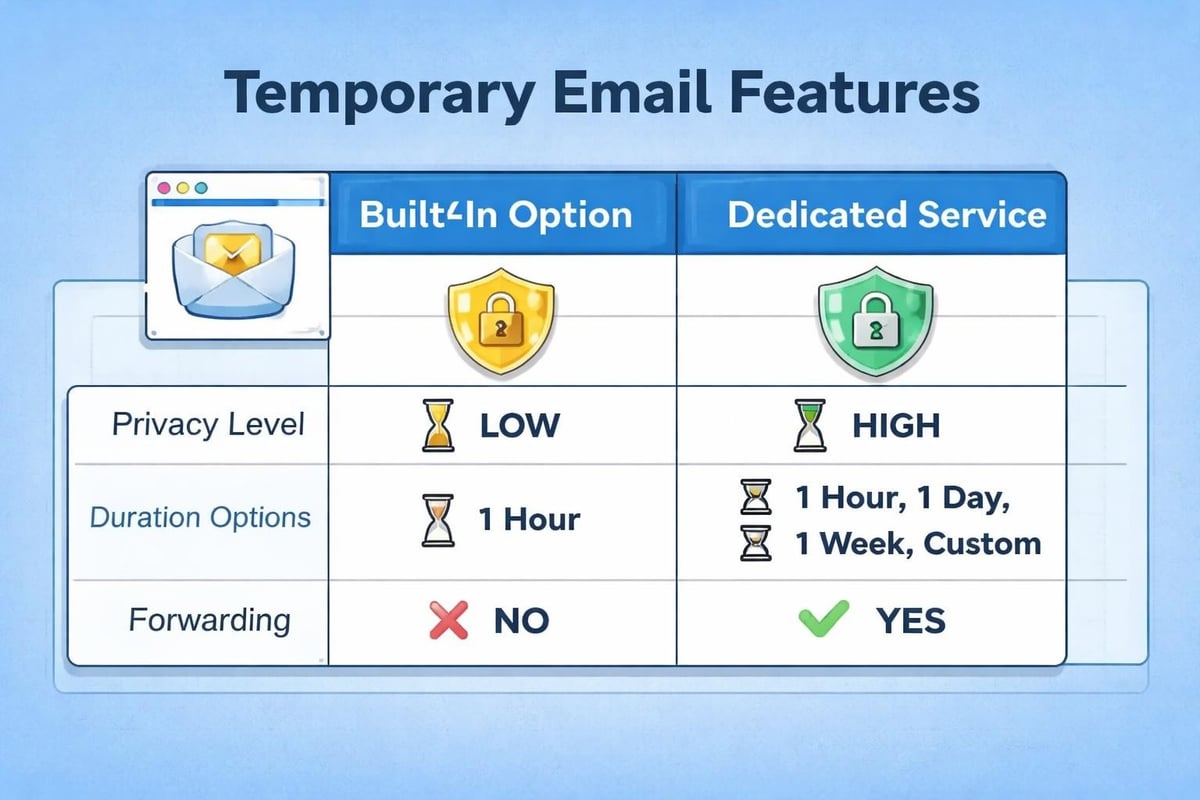
These integrated solutions provide advantages over standalone services because they connect directly to your existing email infrastructure. You maintain control within familiar interfaces whilst benefiting from disposable addressing capabilities.
Premium Privacy-Focused Platforms
For businesses handling sensitive communications or requiring advanced features, premium services offer enhanced security and reliability. These platforms typically charge subscription fees but deliver enterprise-grade privacy protection and customer support.
Premium features often include:
- Custom domain integration for branded temporary addresses
- Longer retention periods with user control
- Encrypted message storage and transmission
- API access for automated address generation
- Dedicated customer support and SLA guarantees
Practical Applications for Email Marketing Businesses
Small businesses in the email marketing sector can leverage one time email addresses in numerous strategic ways. These temporary addresses serve both internal operations and customer-facing functions.
Testing Campaign Deliverability
Before launching campaigns to your entire customer base, testing how messages appear across different email clients and spam filters proves essential. Creating multiple disposable addresses allows you to send test campaigns without cluttering your primary inbox or those of team members.
This testing methodology helps verify:
- Subject line display across various devices
- Image rendering in different email clients
- Link functionality and tracking parameters
- Spam filter reactions to content and formatting
- Mobile responsiveness on multiple platforms
When you test email clients using temporary addresses, you gain authentic insights into subscriber experiences without affecting your sender reputation or internal email systems.
Competitive Research and Analysis
Understanding competitor strategies requires subscribing to their mailing lists. However, using your business email for this purpose creates several problems. Competitors may identify your domain and adjust their visible strategies. Additionally, your inbox becomes cluttered with irrelevant marketing messages.
| Research Activity | Primary Email Risk | One Time Email Benefit |
|---|---|---|
| Competitor newsletters | Domain identification | Complete anonymity |
| Industry monitoring | Permanent list membership | Easy disposal |
| Pricing intelligence | Targeted counter-marketing | No retargeting risk |
| Feature comparison | Ongoing sales outreach | Information only |
A one time email enables comprehensive competitive analysis whilst maintaining operational security. You can subscribe, analyse campaigns, and dispose of the address once research concludes.
Client Onboarding and Service Trials
When evaluating new tools for your email marketing operations, temporary addresses provide risk-free testing environments. Whether exploring new email system features or assessing integration capabilities, disposable addresses prevent vendor lock-in through marketing persistence.
Privacy and Security Considerations
Whilst one time email addresses enhance privacy, understanding their limitations ensures appropriate usage. Not all temporary email solutions offer equal security, and certain use cases require more robust protection than others.
When to Avoid Temporary Addresses
Despite their utility, disposable addresses prove inappropriate for specific situations. Financial transactions, legal communications, and long-term service relationships demand permanent, verifiable email addresses. Professional business email addresses remain essential for building trust and maintaining accountability.
Situations requiring permanent email:
- Banking and financial service registration
- Legal document receipt and contracts
- Customer relationship management
- Employee communications and HR matters
- Long-term vendor relationships
Detection and Blocking Concerns
Many online services actively identify and block disposable email addresses. Understanding how businesses detect temporary addresses helps you choose services less likely to face restrictions. Some platforms maintain databases of known disposable email domains, whilst others analyse address patterns or domain age.
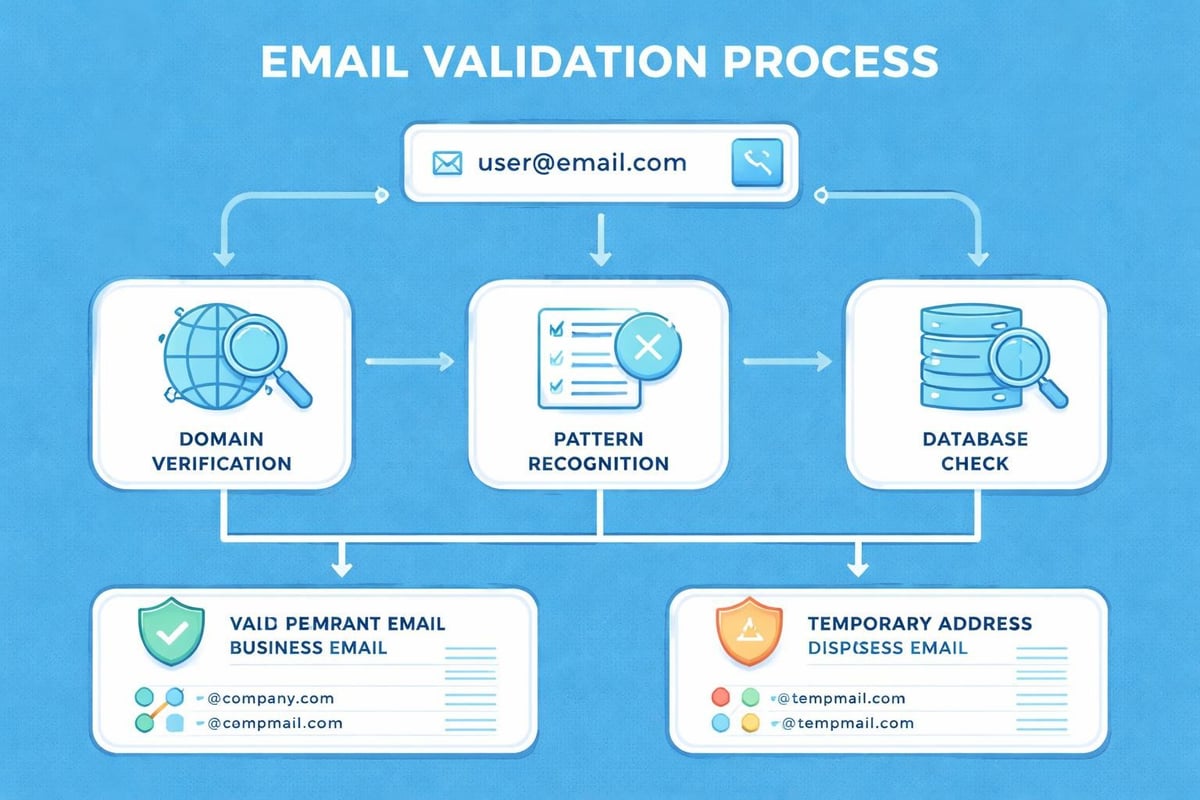
Advanced email validation services check multiple factors including domain MX records, SMTP verification, and disposable email database matching. When services implement strict validation, even legitimate temporary addresses may be rejected.
Data Protection Compliance
For UK-based small businesses, GDPR compliance extends to how you collect and process email addresses. When using temporary addresses for legitimate business purposes, ensure your practices align with data protection principles. Understanding antispam policies becomes crucial when temporary addresses intersect with marketing operations.
Temporary email usage must consider:
- Legitimate interest grounds for data processing
- Transparency about identity in business communications
- Right to be informed requirements
- Data minimisation principles
Integration With Business Email Workflows
Effectively incorporating one time email capabilities into your existing email infrastructure requires strategic planning. Small businesses benefit most when temporary addressing complements rather than complicates their communication systems.
Creating a Hybrid Email Strategy
The optimal approach combines permanent business addresses for client-facing communications with temporary addresses for auxiliary functions. This dual-track system maintains professionalism whilst enhancing privacy and reducing inbox clutter.
Consider structuring your email hierarchy as follows:
- Primary business domain for customer communications and official correspondence
- Department-specific addresses for team collaboration and internal projects
- Temporary addresses for trials, downloads, and competitive research
- Testing addresses for campaign validation and quality assurance
- Archive addresses for long-term record keeping
When establishing your business email account structure, plan for temporary address integration from the beginning. This foresight prevents future complications and ensures smooth workflows.
Automation and Address Management
Managing multiple temporary addresses manually becomes unwieldy quickly. Implementing systems to track which disposable address connects to which service prevents confusion and ensures you don't miss important messages before addresses expire.
Effective management strategies include:
- Maintaining a spreadsheet logging temporary addresses and their purposes
- Using browser extensions that generate and track disposable addresses
- Setting calendar reminders before address expiration for critical services
- Implementing forwarding rules to route important messages to permanent inboxes
- Regularly reviewing and purging expired addresses from tracking systems
For businesses using email marketing platforms like Astonish Email, integrating temporary address testing into campaign workflows ensures deliverability validation without compromising primary inboxes.
Best Practices for Business Implementation
Successfully deploying one time email strategies requires adherence to practical guidelines that balance convenience with security. These best practices emerge from real-world business applications across various industries.
Selecting Appropriate Services
Not all temporary email providers suit business purposes equally. Evaluate potential services against specific criteria before incorporating them into workflows. Security, reliability, and feature sets vary dramatically across providers.
| Evaluation Criteria | Priority Level | Key Considerations |
|---|---|---|
| Privacy policy | Critical | Data handling, logging practices, third-party sharing |
| Address lifespan | High | Adequate duration for intended purpose |
| Forwarding capability | Medium | Ability to route to permanent inbox |
| Mobile accessibility | Medium | Apps or responsive web interface |
| Spam filtering | Low | Basic protection from forwarded spam |
Choose services with transparent privacy policies that explicitly state they don't log or sell user data. For sensitive business research, prioritise providers with strong security credentials and European data hosting.
Documentation and Team Training
When implementing temporary email usage across your small business team, clear documentation prevents confusion and ensures consistent application. Team members need to understand when temporary addresses are appropriate and which services to use for different scenarios.
Develop guidelines addressing:
- Approved temporary email services for company use
- Situations requiring permanent versus temporary addresses
- Procedures for tracking and managing disposable addresses
- Reporting protocols if temporary addresses become compromised
- Integration with existing email and project management tools
Training should emphasise that whilst one time email addresses enhance privacy, they don't replace good security practices. Team members must still maintain strong passwords, enable two-factor authentication where possible, and recognise phishing attempts.
Monitoring and Adjusting Strategies
Email practices evolve constantly, and temporary address strategies must adapt accordingly. Regular reviews of your approach ensure it continues meeting business needs whilst addressing emerging threats and opportunities.
Quarterly review processes should examine:
- Which temporary email services remain functional and reliable
- Whether any addresses became compromised or blocked
- How effectively the strategy reduces spam and protects privacy
- Whether new services offer superior features or security
- Team compliance and any challenges members face
These reviews provide opportunities to refine your approach, update documentation, and ensure your temporary email strategy delivers maximum value. Connecting these practices with your broader email benefits analysis helps quantify the impact on business efficiency.
Advanced Techniques for Power Users
Beyond basic temporary email usage, sophisticated strategies can enhance both privacy and productivity for small business owners managing complex email ecosystems.
Custom Domain Disposable Addresses
Some advanced users create their own temporary email infrastructure using custom domains. This approach provides complete control over address creation, lifespan, and data handling. By setting up catch-all email forwarding on a secondary domain, you can create unlimited addresses on the fly simply by modifying the local part before the @ symbol.
This technique offers several advantages. You maintain brand consistency even with temporary addresses, control exactly how long addresses remain active, and avoid reliance on third-party services that might change policies or shut down. However, it requires technical expertise and ongoing domain maintenance.
Email Aliasing Systems
Modern email platforms increasingly support sophisticated aliasing that goes beyond simple plus-sign address modifications. These systems allow creating multiple distinct addresses that all route to a single inbox whilst appearing completely different to recipients.
Aliasing proves particularly valuable when you need addresses that look professional but remain disposable. Rather than using obviously temporary addresses like "randomstring123@tempmail.com", you can create business-appropriate addresses that still offer the privacy benefits of temporary email.
Integration With Password Managers
Leading password managers now include temporary email generation as a feature. This integration streamlines the process of creating unique credentials for each service whilst maintaining organised records of where each address was used.
When combined with unique passwords for every service, temporary email addresses create comprehensive security layers. If a service experiences a data breach, your exposure remains limited to that specific address-password combination, with no pathway to your primary communications or other accounts.
One time email addresses represent an essential privacy tool for small businesses navigating today's complex digital landscape. By strategically implementing temporary addresses for testing, research, and auxiliary functions whilst maintaining professional permanent addresses for client communications, businesses achieve optimal security without sacrificing functionality. Whether you're evaluating new marketing tools, conducting competitive analysis, or simply protecting your primary inbox from spam, temporary email solutions offer flexibility and control. Astonish Email understands the communication challenges facing small businesses and provides robust email marketing solutions that respect your privacy whilst delivering powerful engagement tools. Explore how professional email management can transform your business communications today.