Free Business Email: A Complete Guide for Small Businesses
April 09, 2026
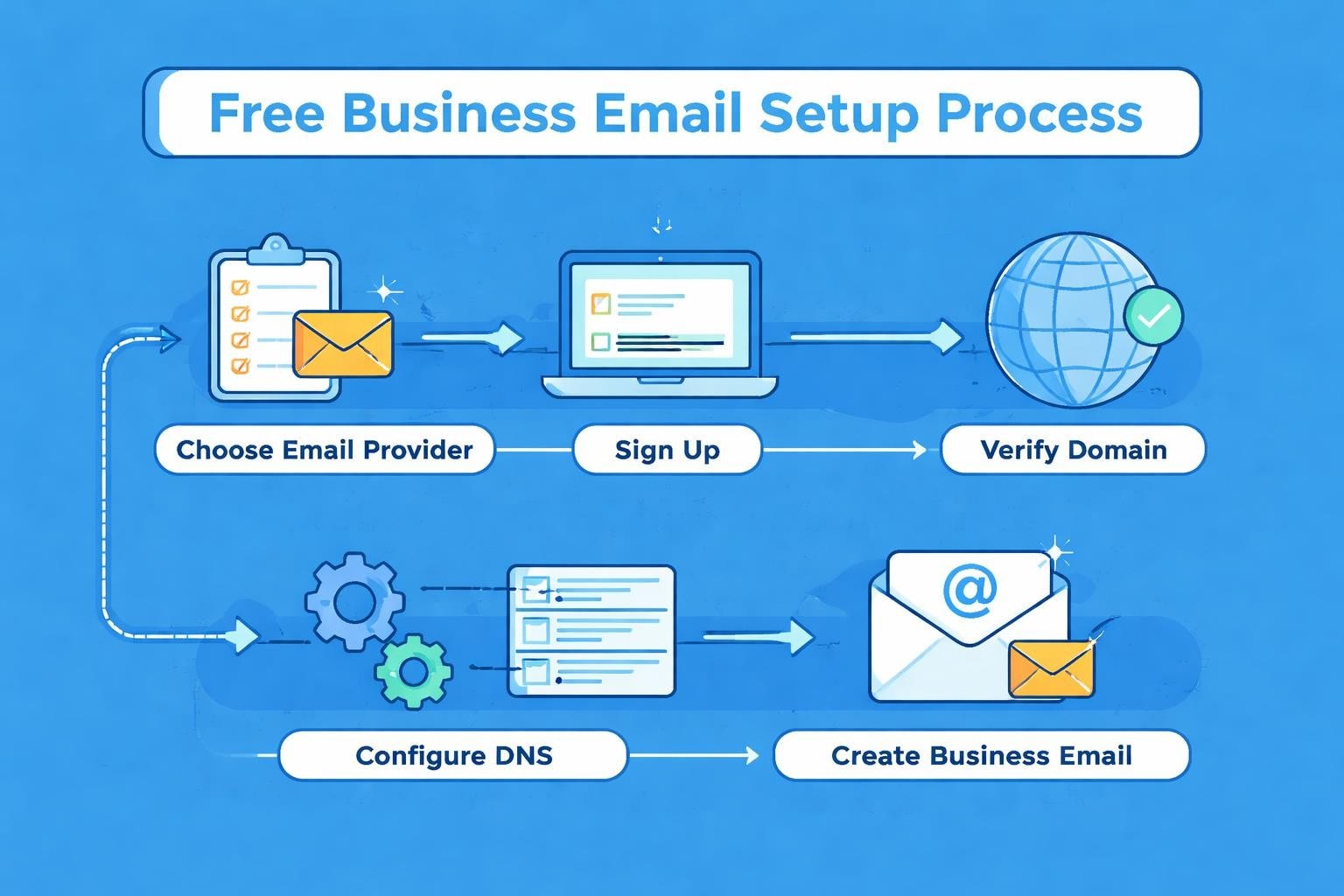
Establishing a professional online presence starts with your email address. For small businesses and entrepreneurs, a free business email solution offers an accessible entry point to build credibility without significant upfront costs. While generic addresses like yourname@gmail.com might suffice for personal use, professional communications demand something more substantial. The right email solution can transform how customers perceive your brand whilst providing essential tools for managing customer relationships and marketing campaigns.
Understanding Free Business Email Solutions
A free business email differs fundamentally from personal email accounts in several important ways. These solutions typically allow you to use a custom domain name, creating addresses like hello@yourbusiness.com rather than relying on generic providers. This distinction matters enormously when potential customers evaluate your legitimacy and professionalism.
The market offers various approaches to free business email, each with distinct advantages and limitations. Some providers offer genuinely free tiers with basic functionality, whilst others provide trial periods before requiring payment. Understanding these differences helps you make an informed decision that aligns with your business requirements.
Key Features to Consider
When evaluating free business email options, several features deserve careful consideration:
- Custom domain support for branded email addresses
- Storage capacity for emails and attachments
- Security features including encryption and spam filtering
- Mobile accessibility through apps or responsive webmail
- Integration capabilities with other business tools
- Number of email accounts permitted under the free tier
Most small businesses require between 2-5 email accounts initially, covering general enquiries, sales, support, and individual team members. Setting up a business email involves balancing these requirements against available features from different providers.
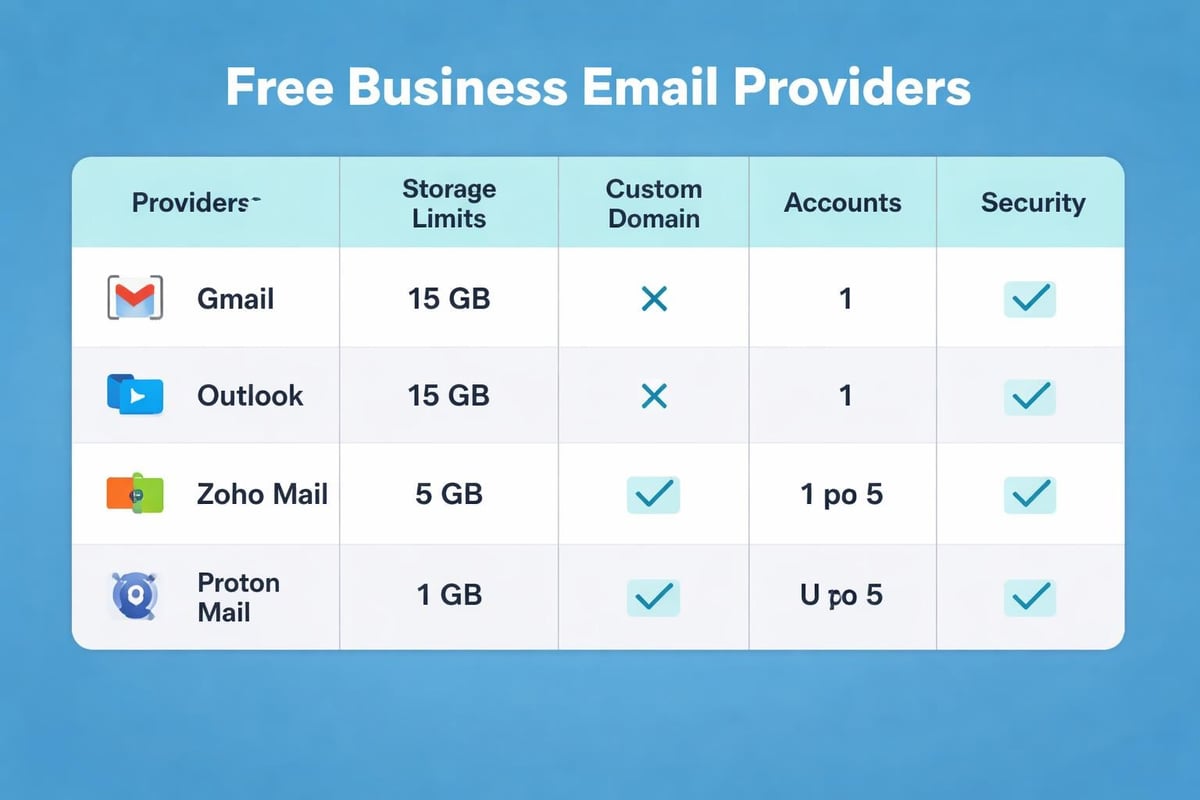
Popular Free Business Email Providers
The landscape of free business email solutions continues to evolve in 2026, with established players and newcomers offering compelling options for small businesses.
Gmail for Business
Google Workspace (formerly G Suite) offers a limited free option through standard Gmail accounts that can be configured with custom domains using email forwarding. Whilst the full Workspace suite requires payment, resourceful small businesses can leverage Gmail's robust infrastructure alongside third-party domain providers. The Gmail platform provides excellent spam filtering, 15GB of shared storage across Google services, and seamless integration with Calendar, Drive, and Meet.
Advantages:
- Industry-leading spam protection
- Familiar interface requiring minimal training
- Excellent mobile applications
- Strong integration ecosystem
Limitations:
- Storage shared across Google services
- Advanced features require paid upgrade
- Less customization for branding
Zoho Mail
Zoho Mail stands out by offering a genuinely free tier for up to five users with custom domain support. This makes it particularly attractive for small teams requiring professional email addresses without monthly fees. The platform includes 5GB storage per user, adequate for most small business email volumes.
| Provider | Free Users | Storage Per User | Custom Domain | Mobile App |
|---|---|---|---|---|
| Zoho Mail | 5 | 5GB | Yes | Yes |
| Gmail | Unlimited | 15GB (shared) | Limited | Yes |
| ProtonMail | 1 | 500MB | No (paid only) | Yes |
| Outlook | 1 | 15GB | Limited | Yes |
Microsoft Outlook
Microsoft offers free Outlook.com accounts with substantial storage and Office Online integration. Whilst custom domains aren't directly supported in the free tier, businesses can use email forwarding or consider the affordable Microsoft 365 Business Basic plan. The interface remains professional and familiar to many users.
Setting Up Your Free Business Email
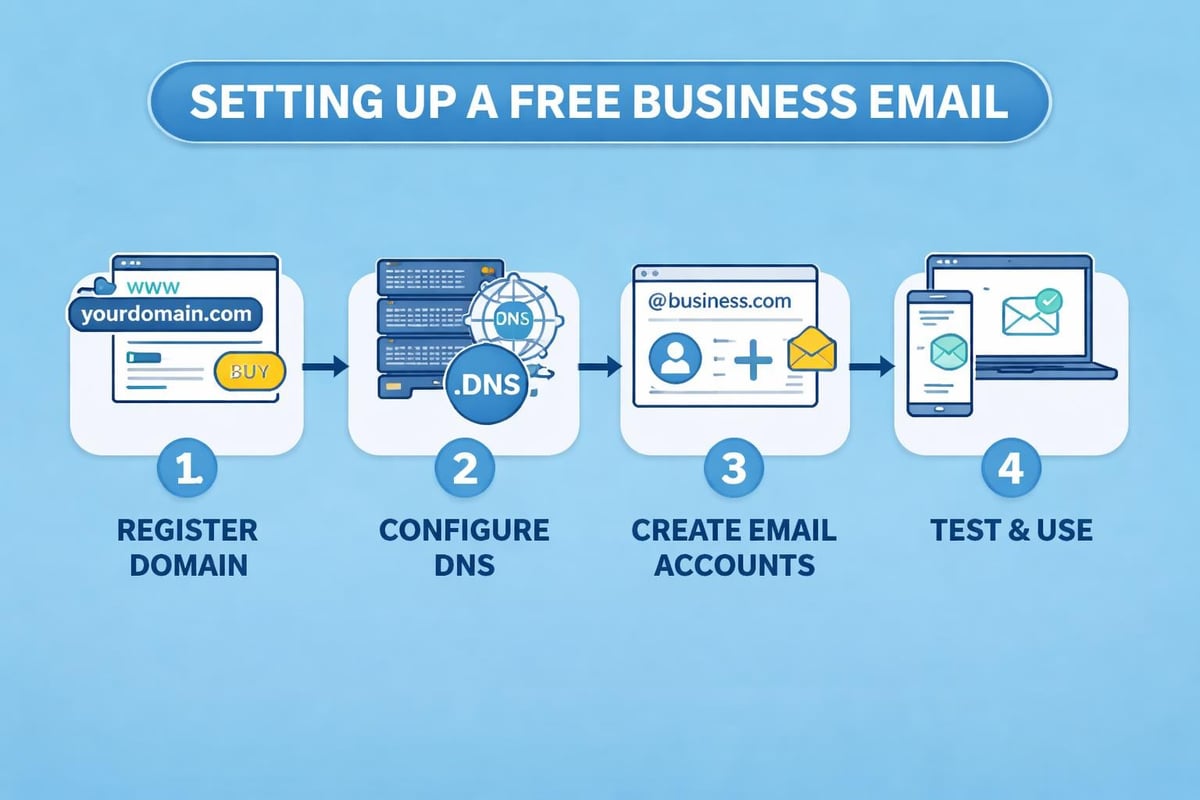
The setup process varies by provider but follows similar fundamental steps. Success depends on proper configuration and attention to detail during initial setup.
Domain Configuration Requirements
Before establishing your free business email, you'll need a registered domain name. Domain registration costs typically range from £5-15 annually, representing a minimal investment for professional branding. Once secured, you'll configure DNS records to direct email traffic to your chosen provider.
Essential DNS records include:
- MX records pointing to your email provider's servers
- SPF records validating legitimate senders
- DKIM records adding cryptographic signatures
- DMARC policies specifying authentication requirements
These technical elements might seem daunting initially, but most providers offer clear guidance and automated setup wizards. Creating a professional business email address becomes straightforward with proper documentation.
Account Creation and Configuration
After configuring DNS settings, create your email accounts following your chosen naming convention. Common approaches include firstname@domain.com, role-based addresses like sales@domain.com, or department-specific accounts such as support@domain.com. Consistency matters for professionalism and memorability.
Configure essential settings including:
- Signature blocks with contact information
- Auto-responder messages for common enquiries
- Email forwarding rules
- Spam filtering preferences
- Mobile device synchronization
Maximizing Free Business Email Effectiveness
Simply having a free business email address isn't sufficient. Effective utilization requires strategic implementation and ongoing management to extract maximum value from your chosen platform.
Email Organization Strategies
Implement folder structures and labeling systems from day one. Categorize emails by client, project, priority, or department depending on your business model. Most free business email providers support advanced filtering rules that automatically sort incoming messages, saving considerable time and reducing inbox clutter.
Recommended folder structure:
- Clients (with subfolders for each major account)
- Projects
- Administrative
- Marketing
- Archive
Establishing these systems early prevents the overwhelming backlog that many businesses experience as email volume grows. Regular maintenance, including archiving old messages and deleting unnecessary communications, keeps your system responsive and efficient.
Security Best Practices
Free business email accounts often become targets for phishing attacks and unauthorized access attempts. Implementing robust security measures protects both your business data and customer information.
Enable two-factor authentication (2FA) on all accounts without exception. This additional security layer dramatically reduces unauthorized access risk, even if passwords become compromised. Use unique, complex passwords for each account, preferably managed through a password manager application.
Regular security audits should verify:
- Active sessions and authorized devices
- Forwarding rules that might redirect sensitive information
- Third-party applications with email access
- Suspicious login attempts or unusual activity patterns
Integrating Email with Business Operations
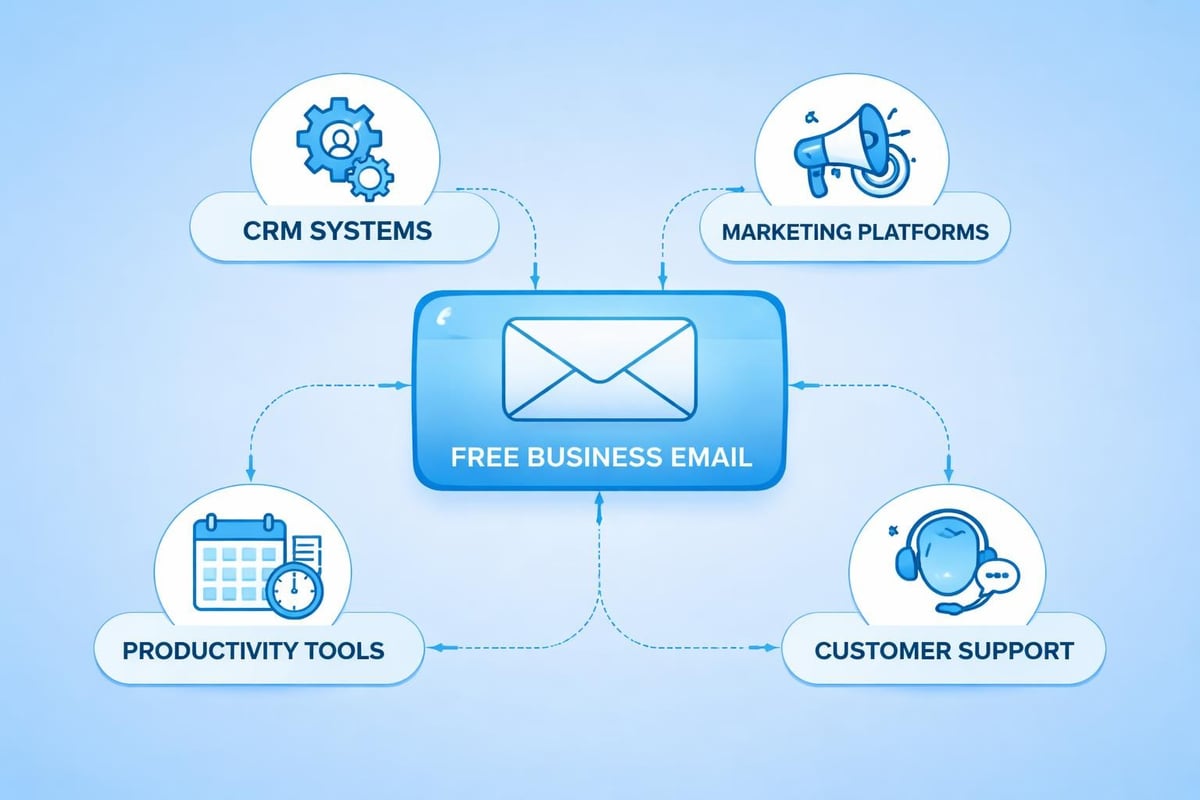
Your free business email shouldn't exist in isolation. Integration with other business tools amplifies its value and streamlines operations across your organization.
Customer Relationship Management
Connecting your email to CRM software transforms scattered communications into organized customer histories. Many free CRM solutions integrate seamlessly with popular email providers, automatically logging correspondence and enabling better customer service.
This integration proves particularly valuable for small businesses managing customer relationships across multiple touchpoints. Every email, enquiry, and response becomes part of the customer record, providing context for future interactions and identifying sales opportunities.
Marketing Integration
For businesses leveraging email marketing, integration between your business email and marketing platforms creates operational efficiency. While your free business email handles day-to-day correspondence, dedicated email marketing tools manage campaigns, newsletters, and automated sequences.
Understanding the benefits of professional email helps small businesses appreciate how proper email infrastructure supports broader marketing objectives. Platforms like Astonish Email specialize in email marketing for small businesses, complementing your operational email with sophisticated campaign capabilities.
Comparing Free Versus Paid Email Solutions
Understanding when to transition from free business email to paid solutions requires honest assessment of your business needs and growth trajectory. Comparing free and paid email providers reveals important distinctions that impact long-term scalability.
When Free Solutions Suffice
Free business email works exceptionally well for:
- Startups validating business concepts
- Solopreneurs and freelancers
- Small teams under five people
- Businesses with modest email volumes
- Companies prioritizing cost minimization
Many businesses operate successfully on free tiers indefinitely, particularly when email represents a communication channel rather than a critical business system. The key consideration involves whether limitations create genuine operational friction or merely represent potential upgrades you don't currently need.
Signals for Upgrading
Certain indicators suggest outgrowing free business email capabilities:
| Indicator | Impact | Solution |
|---|---|---|
| Storage limits reached | Email deletion required | Upgrade storage or platform |
| Team exceeds free user count | New members unsupported | Paid tier or alternative provider |
| Advanced security needed | Compliance requirements unmet | Enterprise email solution |
| Integration limitations | Workflow inefficiencies | Platform with better API access |
| Support requirements | Downtime impacts revenue | Provider with SLA guarantees |
Email Client Selection and Configuration
Choosing the right email client significantly impacts productivity and user experience. While webmail interfaces provide universal access, dedicated clients offer enhanced functionality and offline capabilities.
Desktop Email Clients
Popular desktop clients include Microsoft Outlook, Apple Mail, Mozilla Thunderbird, and various alternatives. These applications provide unified inboxes combining multiple accounts, advanced search capabilities, and superior organization tools compared to webmail interfaces.
Configuration requires entering server settings provided by your free business email host:
- Incoming mail server (IMAP or POP3)
- Outgoing mail server (SMTP)
- Port numbers and encryption settings
- Authentication credentials
Most modern clients support automatic configuration for major providers, simplifying the setup process considerably.
Mobile Email Management
Mobile access proves essential for businesses operating beyond traditional office environments. Native mobile apps typically offer superior performance and integration compared to mobile web interfaces, with offline access and push notifications keeping you connected.
Configure mobile devices thoughtfully to balance accessibility with work-life boundaries. Notification settings, quiet hours, and selective synchronization prevent email from becoming an constant distraction whilst ensuring important messages reach you promptly.
Common Challenges and Solutions
Operating with free business email presents specific challenges that businesses can anticipate and address proactively.
Storage Management
Storage limitations represent the most common constraint with free business email. Address this through regular maintenance:
- Archive messages older than 12 months
- Delete emails with large attachments after saving files elsewhere
- Unsubscribe from unnecessary mailing lists
- Use cloud storage links rather than attachments when sharing large files
Deliverability Concerns
Free business email sometimes faces deliverability challenges as recipients' spam filters scrutinize unfamiliar domains. Improve delivery rates by:
- Properly configuring SPF, DKIM, and DMARC records
- Avoiding spam trigger words in subject lines
- Building sender reputation gradually
- Maintaining clean email lists
- Monitoring blacklist status regularly
Professional Limitations
Some free tiers restrict branding customization or include provider advertising in email footers. Whilst less common in 2026 than previously, these limitations can undermine professional presentation. Research providers carefully and test email appearance before committing to a platform.
Building Email Best Practices
Establishing professional email habits from inception prevents bad practices from becoming entrenched as your business grows. Creating professional communication standards applies regardless of whether you're using free or paid email solutions.
Response Time Standards
Set and communicate expected response times for different email categories. Customer enquiries might warrant 24-hour responses, whilst internal communications could allow longer timeframes. Consistency builds trust and manages expectations effectively.
Email Etiquette Guidelines
Develop company guidelines covering:
- Subject line clarity and specificity
- Greeting and closing formality levels
- Appropriate use of CC and BCC fields
- Attachment file naming conventions
- Signature block standard information
These standards ensure consistent professionalism across your organization, particularly important when multiple team members communicate with customers.
Documentation and Knowledge Sharing
Use email systematically to document important decisions, agreements, and customer commitments. Well-organized email archives serve as valuable business records, resolving disputes and providing institutional memory as team members change.
Scaling Beyond Free Email Solutions
Eventually, many businesses outgrow free business email capabilities. Understanding your growth trajectory helps plan transitions without disruption.
Migration Planning
Email migration requires careful planning to avoid losing important communications or experiencing service interruptions. Key considerations include:
- Exporting existing emails and contacts
- Communicating address changes to customers
- Maintaining forwarding during transition periods
- Testing new configuration thoroughly before cutover
- Training team members on new systems
Evaluating Upgrade Paths
When considering paid solutions, evaluate total cost of ownership rather than simply monthly subscription fees. Factor in migration costs, training time, productivity impacts during transition, and potential integration expenses.
Many businesses find that professional email solutions provide sufficient value through enhanced security, better support, and advanced features to justify modest monthly investments. The decision ultimately depends on your specific business requirements and growth projections.
Complementary Tools and Services
Free business email forms one component of your broader communication and marketing infrastructure. Strategic integration with complementary tools multiplies its effectiveness.
Email Marketing Platforms
While your free business email handles operational communications, dedicated email marketing platforms manage promotional campaigns, newsletters, and automated sequences. These specialized tools provide analytics, segmentation capabilities, and compliance features that operational email wasn't designed to deliver.
Small businesses benefit from separating operational and marketing email functions, maintaining sender reputation whilst leveraging appropriate tools for each communication type. Consider how email marketing for small businesses complements rather than competes with operational email requirements.
Productivity Enhancements
Calendar integration, task management, and team collaboration tools enhance email productivity significantly. Many free business email providers offer basic versions of these tools, with third-party applications providing additional capabilities when needed.
Productivity integrations worth considering:
- Shared calendars for meeting coordination
- Task management synchronized with email
- Document collaboration linked from messages
- Video conferencing integrated into invitations
- Contact management with enriched customer data
Free business email provides small businesses with accessible, professional communication tools without significant upfront investment. By carefully selecting providers, implementing best practices, and integrating email thoughtfully into broader business operations, companies build credible customer relationships whilst maintaining operational efficiency. When you're ready to elevate your email marketing beyond operational communications, Astonish Email offers specialized tools designed specifically for small businesses looking to maximize customer engagement through strategic email campaigns.