Electronic Mail Systems: A Complete Guide for 2026
March 26, 2026
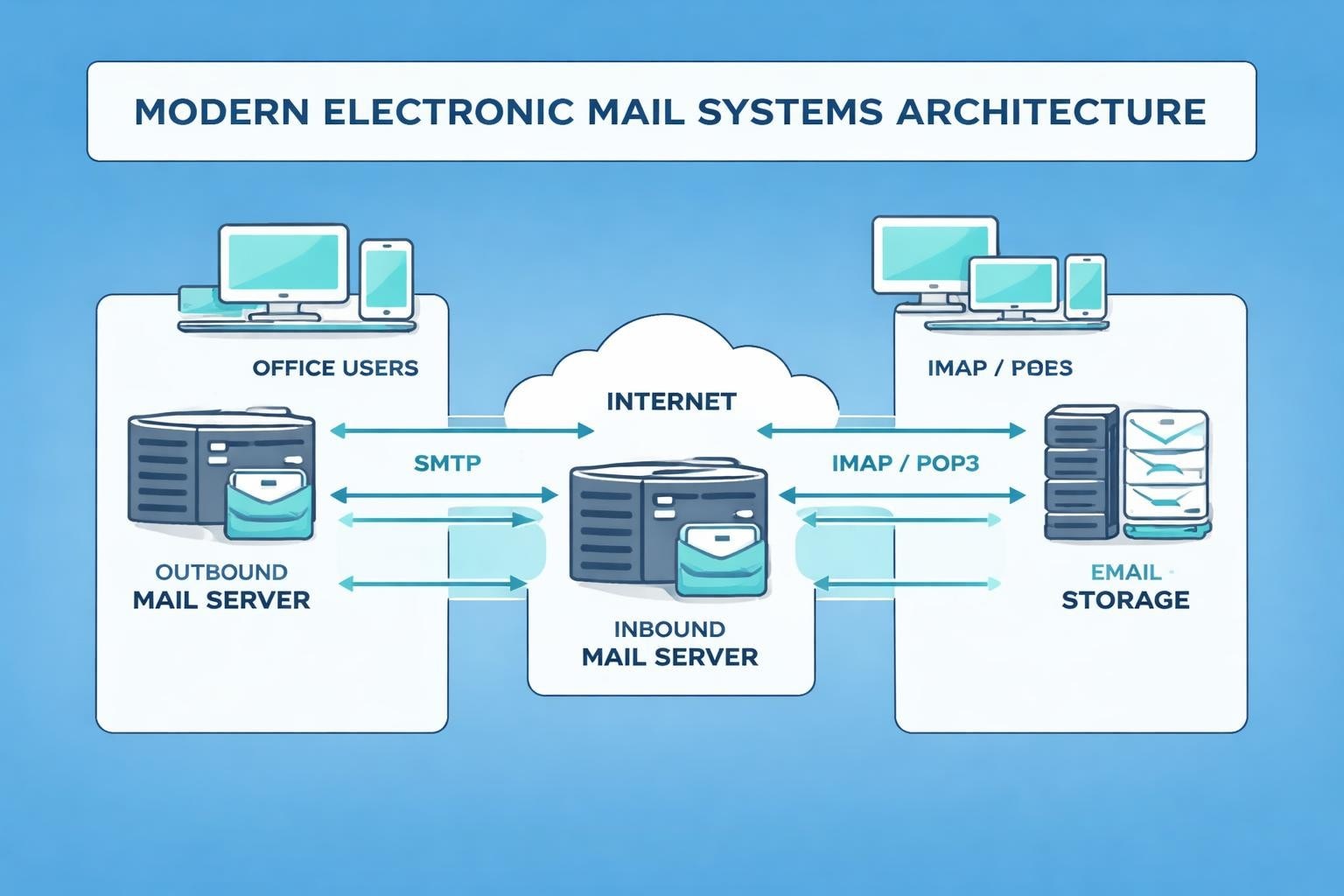
Electronic mail systems have fundamentally transformed how businesses communicate, collaborate, and connect with customers. From their humble beginnings in the 1970s to today's sophisticated platforms, these systems have become the backbone of professional communication. For small businesses, understanding the architecture, protocols, and best practices of electronic mail systems is essential for maximising efficiency and maintaining competitive advantage in an increasingly digital marketplace.
The Architecture of Electronic Mail Systems
The foundation of electronic mail systems rests on three critical components that work together seamlessly. At the heart of every email transaction, you'll find Mail User Agents (MUAs), Mail Transfer Agents (MTAs), and Mail Delivery Agents (MDAs). Each component serves a distinct purpose in ensuring messages reach their intended recipients.
Mail User Agents are the applications users interact with directly, such as popular email clients like Outlook, Thunderbird, or web-based interfaces. These programmes allow composition, sending, receiving, and organisation of messages. The MUA connects to the MTA when you click send, initiating the message's journey across networks.
Core Components and Their Functions
Mail Transfer Agents handle the routing and delivery of messages between servers. When you send an email, your MTA communicates with the recipient's MTA using the Simple Mail Transfer Protocol (SMTP). This process involves:
- DNS lookups to locate the recipient's mail server
- Authentication and verification of sender credentials
- Queue management for messages awaiting delivery
- Retry mechanisms for failed delivery attempts
Mail Delivery Agents complete the chain by placing messages into the recipient's mailbox. The MDA retrieves messages from the queue and stores them in a format the recipient's MUA can access, typically using protocols like POP3 or IMAP.
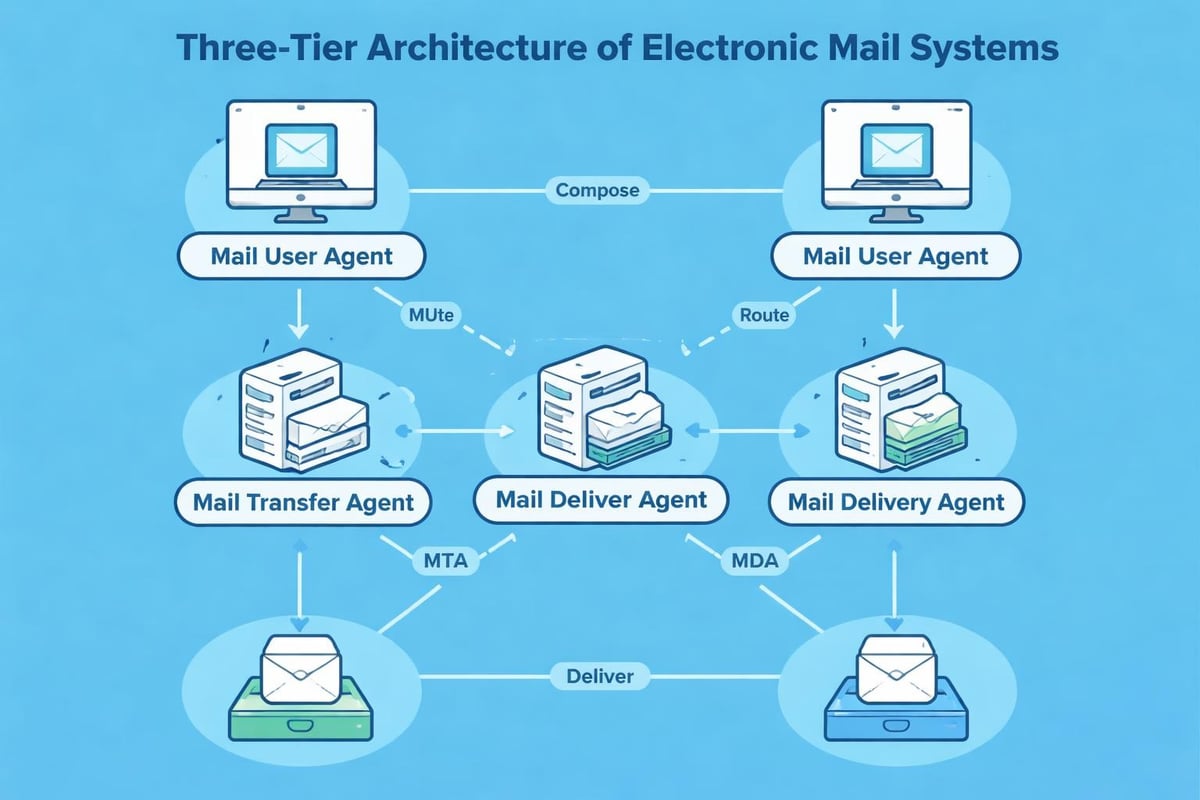
| Component | Primary Function | Common Protocols |
|---|---|---|
| Mail User Agent (MUA) | Message composition and reading | SMTP (outgoing), POP3/IMAP (incoming) |
| Mail Transfer Agent (MTA) | Server-to-server message routing | SMTP, ESMTP |
| Mail Delivery Agent (MDA) | Final message delivery to mailbox | Local delivery protocols |
The Evolution and History of Email Communication
The history of email reveals a remarkable journey from experimental networks to global infrastructure. In 1971, Ray Tomlinson sent the first network email on ARPANET, introducing the @ symbol to separate user names from host computers. This innovation laid the groundwork for modern electronic mail systems.
Throughout the 1980s, various proprietary email systems emerged, each with unique protocols and standards. The challenge was interoperability between different systems. The introduction of standardised protocols like SMTP in 1982 revolutionised electronic communication by enabling different systems to exchange messages reliably.
Milestones in Email Development
By the 1990s, electronic mail systems had become essential business tools. The introduction of MIME (Multipurpose Internet Mail Extensions) allowed users to send attachments, images, and formatted text. This capability transformed email from simple text messaging into a versatile communication platform.
The comprehensive overview of email demonstrates how far these systems have evolved. Modern electronic mail systems support rich media, encryption, mobile access, and sophisticated filtering mechanisms that earlier iterations could never achieve.
Essential Protocols Powering Electronic Mail Systems
Understanding the protocols that underpin electronic mail systems is crucial for businesses seeking to optimise their email infrastructure. SMTP remains the standard for sending messages, whilst POP3 and IMAP handle message retrieval with different approaches.
SMTP operates on port 25 (or ports 587 and 465 for encrypted connections) and follows a straightforward command-response model. When your email system initiates a connection, it follows these steps:
- Establishes TCP connection with recipient's mail server
- Sends HELO or EHLO command to identify itself
- Authenticates credentials if required
- Transmits message content using DATA command
- Closes connection with QUIT command
POP3 Versus IMAP: Choosing the Right Protocol
POP3 (Post Office Protocol version 3) downloads messages to your local device and typically deletes them from the server. This approach suits users who access email from a single device and prefer offline access. However, it creates challenges for modern workers who switch between multiple devices throughout their day.
IMAP (Internet Message Access Protocol) maintains messages on the server, synchronising across all connected devices. This protocol supports:
- Folder organisation and management
- Server-side message searching
- Selective message downloading
- Multiple simultaneous connections
For small businesses implementing professional email addresses, IMAP offers superior flexibility and ensures consistent access regardless of location or device.
Security Considerations in Modern Email Infrastructure
Electronic mail systems face constant threats from spam, phishing, malware, and unauthorised access. Implementing robust security measures is non-negotiable for businesses handling sensitive information and customer communications.
Transport Layer Security (TLS) encrypts data during transmission, preventing interception by malicious actors. Modern electronic mail systems should enforce TLS for all connections, ensuring that messages remain confidential as they traverse networks.
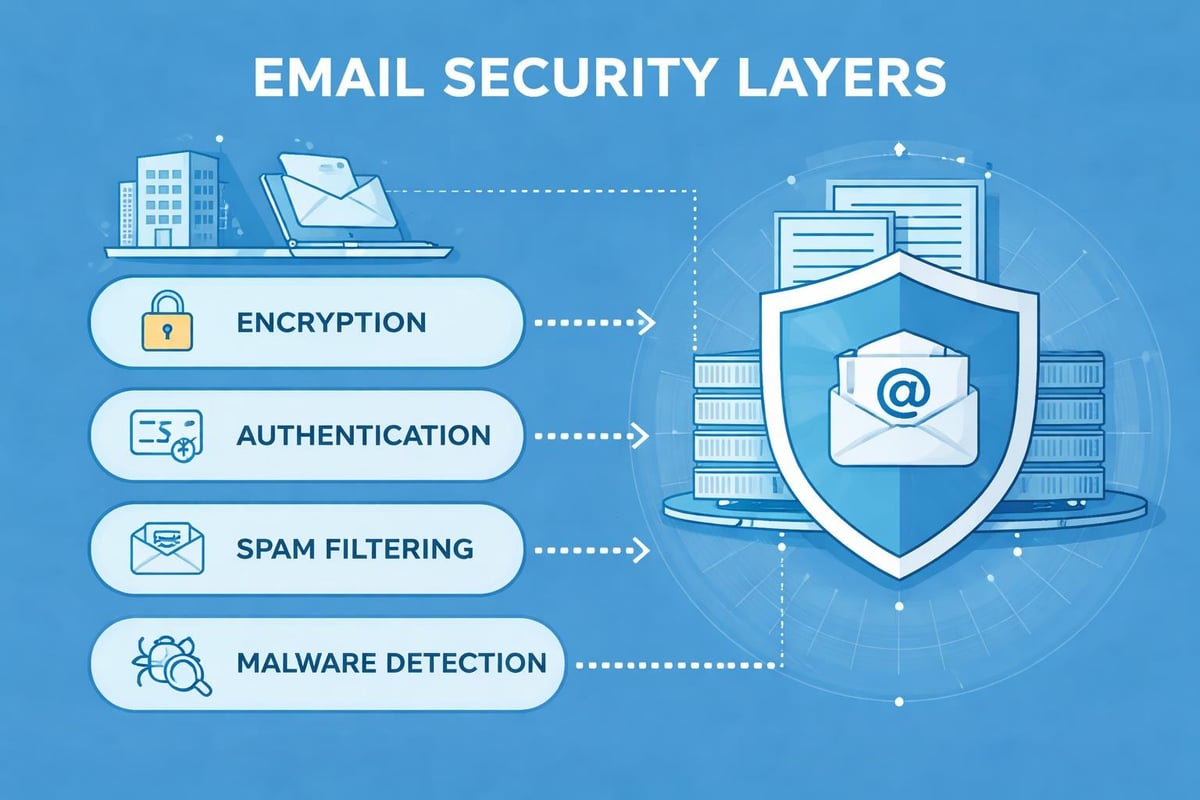
Authentication and Verification Mechanisms
Three critical protocols strengthen email authentication and prevent spoofing:
| Protocol | Purpose | How It Works |
|---|---|---|
| SPF (Sender Policy Framework) | Authorise sending servers | DNS records specify which IP addresses can send mail for a domain |
| DKIM (DomainKeys Identified Mail) | Verify message integrity | Cryptographic signatures confirm messages haven't been altered |
| DMARC (Domain-based Message Authentication) | Enforcement policy | Instructs receiving servers how to handle authentication failures |
Implementing these protocols protects your domain reputation and increases deliverability rates. Without proper authentication, your messages risk being flagged as spam or rejected entirely by recipient servers.
Optimising Electronic Mail Systems for Business Success
Small businesses must approach electronic mail systems strategically to maximise return on investment. The technical aspects of email systems provide valuable insights into optimisation opportunities that many organisations overlook.
List segmentation enables targeted messaging based on customer behaviour, preferences, and demographics. Rather than sending identical messages to your entire database, segment subscribers into meaningful groups. This approach improves engagement rates and reduces unsubscribe requests.
Personalisation extends beyond inserting a recipient's name in the subject line. Modern electronic mail systems support dynamic content that adapts based on recipient data. A retail business might showcase different products to customers based on previous purchases or browsing history.
Deliverability Best Practices
Maintaining high deliverability requires attention to technical configuration and content quality. Start by verifying your domain's DNS records include proper SPF, DKIM, and DMARC entries. These authentication mechanisms signal to receiving servers that your messages are legitimate.
Monitor your sender reputation through services that track complaint rates, bounce rates, and engagement metrics. Electronic mail systems penalise senders who generate high complaint volumes or frequently send to invalid addresses.
- Maintain list hygiene by removing inactive subscribers
- Implement double opt-in to ensure subscriber consent
- Honour unsubscribe requests immediately
- Send consistent volumes to avoid suspicious spikes
- Test messages across different email clients
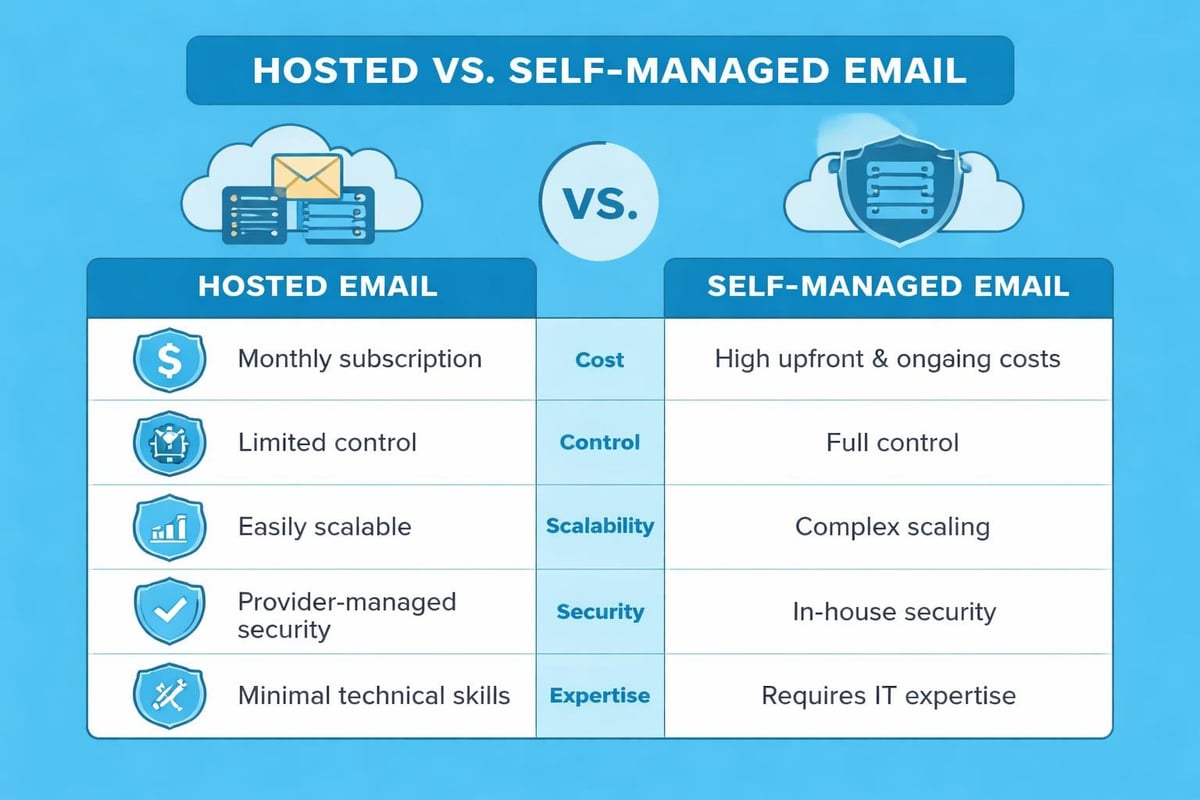
Infrastructure Choices: Hosted Versus Self-Managed
Businesses face a fundamental decision when implementing electronic mail systems: hosting internally or using external providers. Each approach offers distinct advantages depending on organisational needs, technical expertise, and budget constraints.
Self-hosted solutions provide complete control over infrastructure, data, and customisation. Organisations with strict compliance requirements or unique integration needs may prefer running their own mail servers. However, this approach demands significant technical expertise for setup, maintenance, security patching, and troubleshooting.
Third-party hosted services eliminate infrastructure management burdens whilst offering enterprise-grade reliability. Providers handle server maintenance, security updates, spam filtering, and scalability challenges. For small businesses, this model typically proves more cost-effective than maintaining internal infrastructure.
Evaluating Service Requirements
When selecting electronic mail systems, consider these factors:
- Scalability: Can the system grow with your business without significant reinvestment?
- Integration capabilities: Does it connect with your CRM, e-commerce platform, and other tools?
- Compliance features: Does it meet industry-specific regulatory requirements?
- Support quality: What level of technical assistance is available when issues arise?
- Cost structure: How do pricing models align with your usage patterns and budget?
Mobile Optimisation and Multi-Device Access
Electronic mail systems must accommodate users accessing messages across smartphones, tablets, laptops, and desktop computers. Mobile devices now account for the majority of email opens, making responsive design essential rather than optional.
Responsive email templates automatically adjust layout, image sizes, and text formatting based on screen dimensions. This ensures readability whether recipients view messages on a 6-inch phone screen or a 27-inch monitor. Testing across multiple devices and email clients before sending campaigns prevents embarrassing formatting failures.
Consider mobile-specific behaviours when crafting messages. Mobile users typically scan quickly rather than reading thoroughly, favouring concise copy and prominent calls-to-action. Place critical information and action buttons in the top portion of messages to ensure visibility without scrolling.
Automation and Workflow Integration
Modern electronic mail systems excel at automating repetitive tasks and triggering messages based on specific conditions. Automation increases efficiency whilst maintaining personalised customer experiences at scale.
Welcome sequences automatically greet new subscribers with a series of messages introducing your business, explaining what they can expect, and potentially offering an incentive for first purchases. These automated workflows run continuously without manual intervention.
Behavioural triggers respond to specific actions or inactions. When customers abandon shopping carts, automated reminder emails encourage completion of purchases. When subscribers haven't engaged with recent messages, re-engagement campaigns attempt to revive interest before removing them from active lists.
Integration with business email systems enables seamless data flow between platforms. Customer relationship management systems, e-commerce platforms, and analytics tools exchange information with electronic mail systems to create comprehensive customer profiles and inform messaging strategies.
Analytics and Performance Measurement
Effective use of electronic mail systems requires measuring performance and using data to inform continuous improvement. Key metrics provide insights into campaign effectiveness and subscriber engagement patterns.
Open rates indicate what percentage of recipients view your messages, though limitations in tracking technology make this metric somewhat unreliable. Subject line quality, sender name recognition, and sending time all influence open rates.
Click-through rates measure how many recipients take desired actions within messages. This metric more accurately reflects engagement quality than opens alone. Analyse which content types, offers, and calls-to-action generate highest click-through rates to inform future campaigns.
| Metric | What It Measures | Typical Benchmark |
|---|---|---|
| Open Rate | Percentage who open messages | 15-25% |
| Click-Through Rate | Percentage who click links | 2-5% |
| Conversion Rate | Percentage who complete desired action | 1-3% |
| Bounce Rate | Percentage of undeliverable messages | Under 2% |
| Unsubscribe Rate | Percentage who opt out | Under 0.5% |
Conversion tracking connects email engagement to business outcomes. Whether your goal is product purchases, content downloads, event registrations, or consultation bookings, tracking conversions proves the return on investment from your electronic mail systems.
Compliance and Regulatory Requirements
Electronic mail systems must operate within legal frameworks governing commercial communication. Regulations vary by jurisdiction, but common themes include consent requirements, identification obligations, and unsubscribe mechanisms.
The General Data Protection Regulation (GDPR) in the European Union establishes strict rules for processing personal data, including email addresses. Businesses must obtain explicit consent before sending marketing messages to EU residents, maintain records demonstrating consent, and honour data deletion requests.
In the United Kingdom, the Privacy and Electronic Communications Regulations (PECR) work alongside GDPR to govern electronic marketing. These regulations require clear consent for marketing emails and mandate that all messages include simple unsubscribe mechanisms.
United States businesses must comply with the CAN-SPAM Act, which permits commercial email but requires accurate header information, clear message identification, and functional opt-out mechanisms. Violations carry significant penalties, making compliance essential for all organisations operating electronic mail systems.
Future Developments in Email Technology
Electronic mail systems continue evolving to meet changing user expectations and technological capabilities. Artificial intelligence increasingly influences how businesses use email for marketing and customer communication.
Predictive analytics forecast optimal sending times for individual subscribers based on historical engagement patterns. Rather than sending all messages simultaneously, advanced electronic mail systems stagger delivery to reach each recipient when they're most likely to engage.
Machine learning algorithms optimise subject lines, content recommendations, and sender names by analysing which variations perform best with different audience segments. These systems learn continuously, improving performance over time without manual intervention.
Interactive email elements enable recipients to complete actions directly within messages, from confirming appointments to making purchases without visiting external websites. This reduces friction in customer journeys whilst providing richer engagement data for businesses.
Electronic mail systems remain fundamental to business communication and marketing success in 2026. Understanding their architecture, protocols, and best practices empowers small businesses to communicate more effectively with customers whilst maximising returns from marketing investments. Whether you're establishing your first professional email infrastructure or optimising existing systems, implementing the strategies outlined above will improve deliverability, engagement, and conversion rates. Astonish Email provides small businesses with powerful yet accessible email marketing tools designed to simplify campaign creation, automate workflows, and drive measurable results without requiring technical expertise.