Create Email Address: Complete Guide for Small Business
March 22, 2026
Setting up proper email communication is fundamental to running any successful small business. Whether you're launching a new venture or upgrading from a personal email account, knowing how to create email address options that represent your brand professionally is essential. The right email address builds credibility with customers, streamlines communications, and establishes your business identity in the digital marketplace. This comprehensive guide walks you through everything from selecting the perfect email format to implementing security measures that protect your business correspondence.
Why Your Email Address Matters for Business Success
Your email address serves as a digital handshake with potential customers, partners, and suppliers. When you create email address options for your business, you're making a statement about your professionalism and commitment to quality service.
Research consistently shows that customers trust businesses with professional email addresses significantly more than those using free consumer services. A professional email address builds credibility and demonstrates that you've invested in your business infrastructure.
Key benefits of professional email addresses include:
- Enhanced brand recognition with every message sent
- Improved email deliverability rates compared to free services
- Greater control over security and data privacy
- Professional appearance in all business communications
- Scalability as your team grows
Small businesses that establish professional email early avoid the complications of transitioning later when they've already built customer relationships using personal accounts.
Types of Email Addresses for Different Business Needs
Before you create email address accounts, you need to understand which types best serve your business objectives. Different scenarios require different approaches.
Personal Email Providers
Free services like Gmail, Yahoo, and Outlook offer quick setup and zero costs. They work adequately for sole traders just starting out, but they lack the professional polish that builds customer confidence.
When you create a Microsoft account for Outlook.com, you gain access to integrated services, though you'll still be using a generic domain rather than your business name.
Custom Domain Email
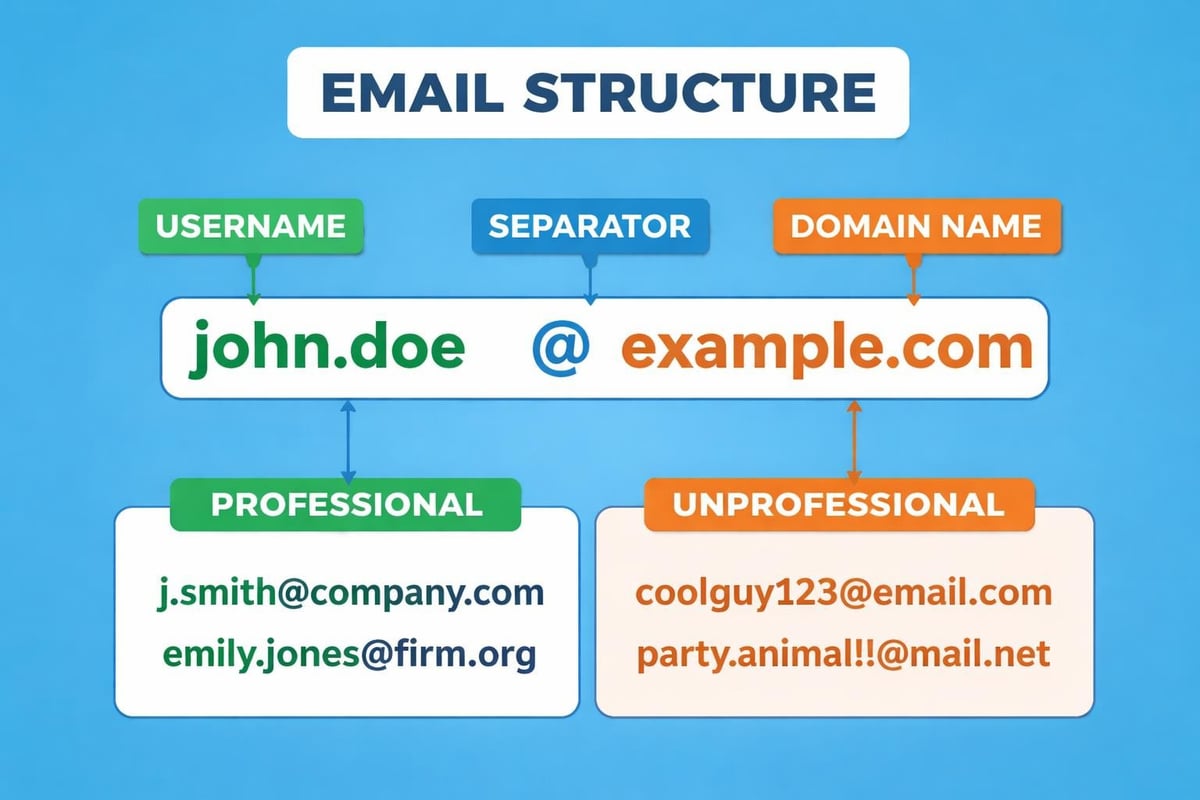
Custom domain email addresses use your business website domain (yourname@yourbusiness.co.uk). This approach provides maximum professionalism and brand consistency across all communications.
| Email Type | Professional Impact | Cost | Control Level | Best For |
|---|---|---|---|---|
| Free Personal | Low | £0 | Limited | Hobbyists, testing |
| Custom Domain | High | £5-15/month | Full | Established businesses |
| Hosted Suite | Very High | £10-30/month | Maximum | Growing teams |
| Hybrid Approach | Medium | £5-10/month | Moderate | Budget-conscious startups |
For small businesses, investing in a business email account from day one prevents the confusion of changing addresses later whilst building customer trust immediately.
Step-by-Step Process to Create Email Address Accounts
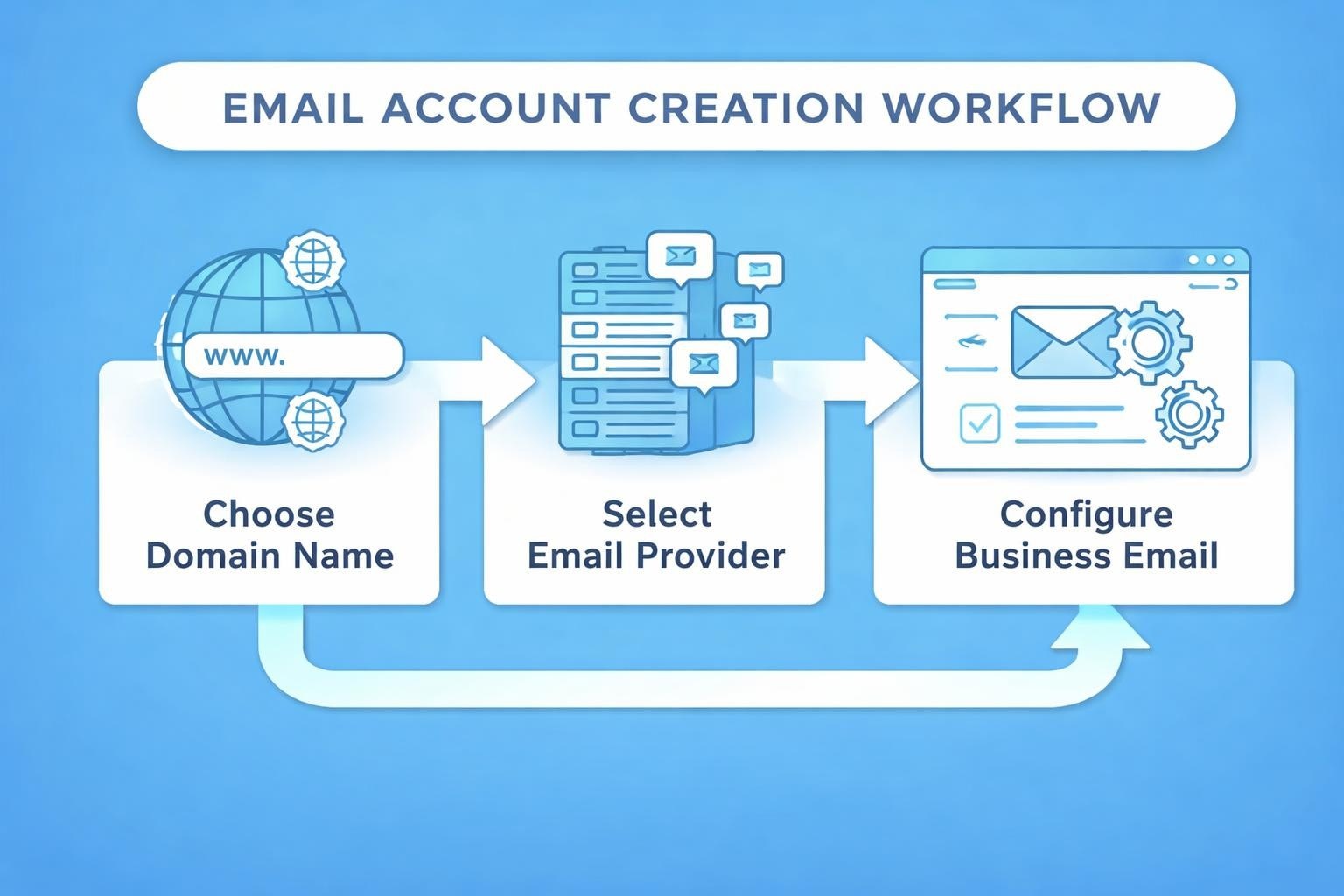
Setting up business email involves several interconnected steps. Following this systematic approach ensures you don't miss critical configuration elements.
Step One: Choose Your Domain Name
Your domain name forms the foundation of your email address. Select something memorable, relevant to your business, and easy to spell. If you already own a website domain, use that for consistency.
Domain considerations include:
- Keep it short and simple
- Avoid hyphens and numbers when possible
- Choose a .co.uk or .com extension for maximum trust
- Verify availability across social media platforms
- Consider future expansion when selecting names
Step Two: Select an Email Hosting Provider
Email hosting providers manage the technical infrastructure that powers your email system. Popular options include Google Workspace, Microsoft 365, and specialized providers focused on small business needs.
When evaluating providers, compare:
- Monthly costs per user account
- Storage limits and expansion options
- Integration with existing tools
- Mobile app functionality
- Customer support availability
- Security features and encryption standards
Many small businesses find that understanding their email system requirements helps narrow the selection to providers offering the right balance of features and affordability.
Step Three: Register and Configure Your Account
Once you've selected a provider, the registration process typically requires basic business information, payment details, and domain verification. Most providers offer straightforward wizards that guide you through initial setup.
Domain verification proves you own the domain you're using for email. This usually involves adding DNS records provided by your email host to your domain registrar's settings. The process sounds technical but most providers offer clear instructions.
Step Four: Create Individual Email Addresses
After verification, you can create email address accounts for yourself and team members. Plan your naming structure carefully to maintain consistency as you grow.
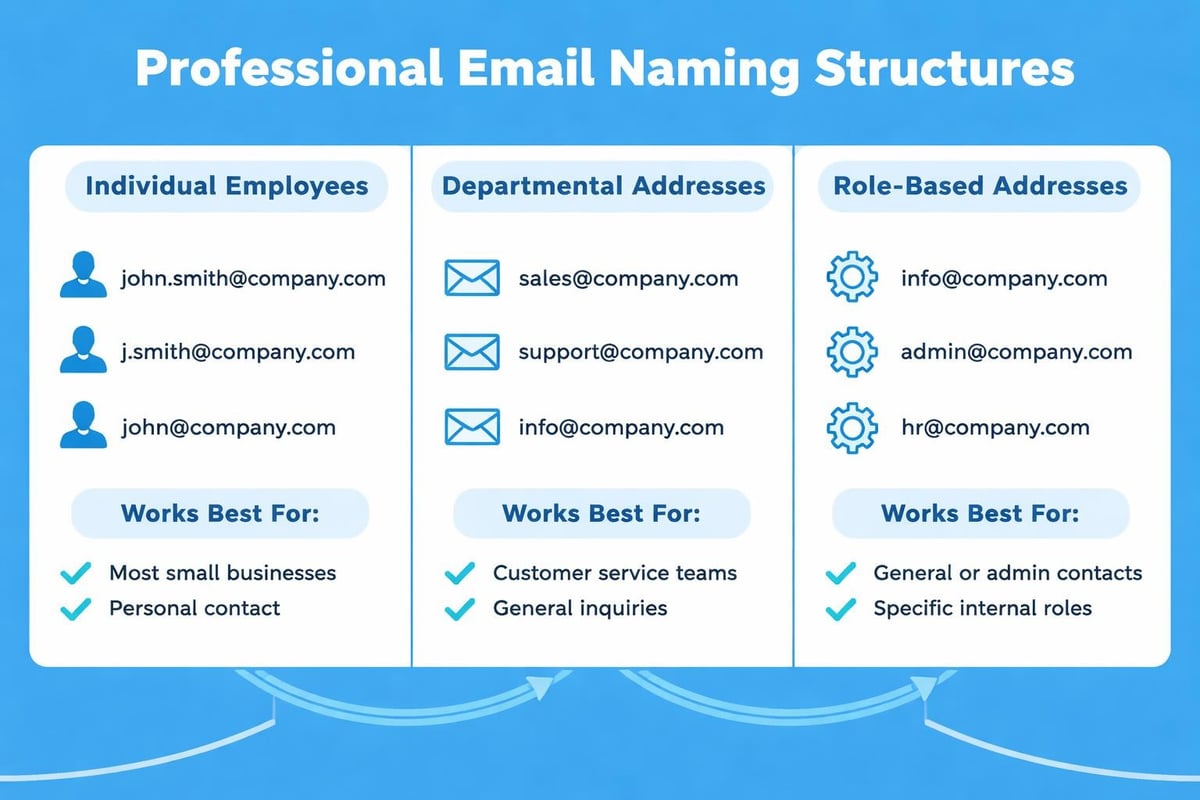
Standard business email formats include:
- firstname@businessname.co.uk (best for small teams)
- firstname.lastname@businessname.co.uk (clear for larger organizations)
- role@businessname.co.uk (useful for shared responsibilities)
- department@businessname.co.uk (good for general enquiries)
Best Practices When You Create Email Address Systems
Simply setting up email isn't enough. Implementing best practices ensures your email system supports business growth whilst maintaining security and professionalism.
Maintaining Professional Standards
Your email address is often the first impression customers receive. Crafting the perfect email address requires attention to detail and forward thinking.
Avoid common mistakes like excessive numbers, personal nicknames, or complex character combinations. Keep addresses straightforward and memorable. Understanding what makes an email address professional helps you avoid choices you'll later regret.
Security and Privacy Considerations
Email security protects both your business data and customer information. When you create email address accounts, implement these security measures from the start:
- Enable two-factor authentication on all accounts
- Use strong, unique passwords for each address
- Configure spam filtering to protect against phishing
- Set up regular password rotation policies
- Train team members on security protocols
Following email best practices reduces vulnerability to attacks whilst maintaining communication effectiveness.
Organisation and Management
As your business grows, managing multiple email addresses becomes increasingly complex. Establish organisational systems early to prevent chaos later.
Create clear guidelines for:
- Response time expectations for different address types
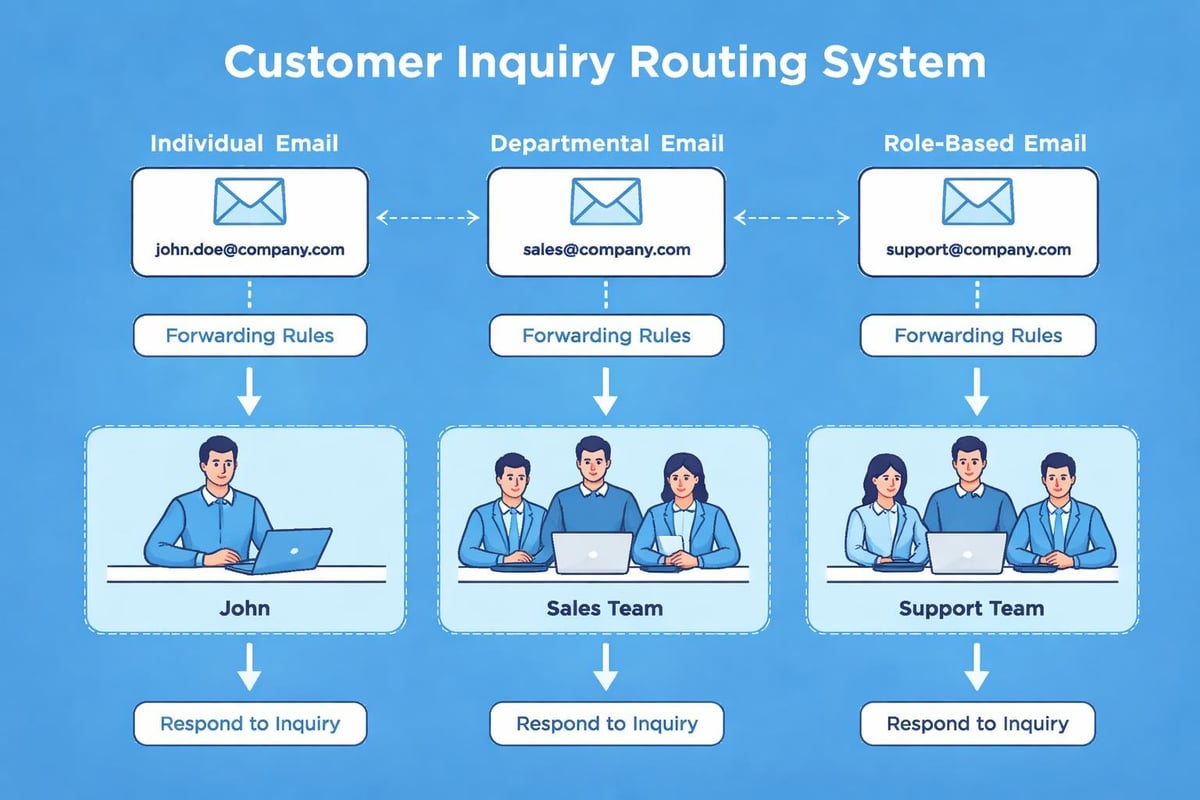
- Forwarding rules for holiday coverage
- Archive and retention policies
- Access permissions for shared addresses
- Signature formatting standards across all addresses
Considering your business email needs holistically ensures your email infrastructure scales smoothly as your team expands.
Common Email Address Formats and When to Use Them
Different email formats serve different purposes within your business communications strategy. Understanding these variations helps you create email address options that support specific functions.
Individual Employee Addresses
These addresses identify specific team members and create personal connections with customers. They work best for client-facing roles where relationship building matters.
Format examples: sarah.jones@astonishemail.co.uk or sjones@astonishemail.co.uk
Use individual addresses when you want customers to develop relationships with specific team members, track individual performance metrics, or maintain clear accountability for communications.
Departmental and Role-Based Addresses
Generic addresses like sales@, support@, or info@ distribute incoming messages to multiple team members. They ensure continuity when individual employees are unavailable.
| Address Type | Primary Purpose | Forwarding Setup | Best Response Time |
|---|---|---|---|
| info@ | General enquiries | All team members | Within 24 hours |
| sales@ | Sales enquiries | Sales team only | Within 4 hours |
| support@ | Customer help | Support rotation | Within 2 hours |
| accounts@ | Financial matters | Finance team | Within 24 hours |
These addresses provide flexibility whilst maintaining professionalism. However, they can feel impersonal, so balance them with individual addresses for important relationships.
Alias Addresses
Email aliases let you create email address variations that forward to existing accounts. You might use different aliases for marketing campaigns, tracking purposes, or temporary projects without creating entirely new mailboxes.
Technical Considerations and Email Standards
Understanding the technical foundations helps you create email address systems that function reliably across all platforms and devices.
Email Address Syntax Rules
The technical syntax of email addresses follows specific standards that ensure compatibility. Valid addresses contain a local part (before the @), the @ symbol, and a domain part (after the @).
Valid characters include letters, numbers, and certain special characters in specific positions. Most businesses stick to simple alphanumeric characters to avoid compatibility issues.
DNS Configuration and MX Records
Mail Exchange (MX) records in your domain's DNS settings direct incoming email to the correct mail servers. Proper configuration ensures reliable message delivery both ways.
When you add a new email address to your system, these records ensure messages reach the intended destination without bouncing or getting lost.
Mobile Access and Synchronisation
Modern business requires email access from multiple devices. When you create email address accounts, configure them for seamless synchronisation across desktops, laptops, tablets, and smartphones.
Most professional email providers offer:
- Native mobile applications for iOS and Android
- IMAP protocol support for synchronised access
- Cloud storage for accessing messages anywhere
- Automatic backup and recovery systems
- Push notifications for time-sensitive messages
Testing your email setup across various email clients ensures consistent experience regardless of how team members access their accounts.
Integration with Business Tools and Marketing Platforms
Email addresses don't exist in isolation. They integrate with numerous business systems that enhance productivity and customer engagement.
Customer Relationship Management
Connecting your email to CRM systems creates comprehensive customer communication histories. Every message becomes part of the customer record, providing context for future interactions.
Email Marketing Integration
When you create email address accounts for your business, consider how they'll integrate with your marketing efforts. Dedicated sending addresses for newsletters and campaigns protect your primary business addresses from spam complaints whilst maintaining brand consistency.
Understanding email marketing best practices helps small businesses leverage their email infrastructure for growth without overwhelming resources or damaging deliverability.
Productivity Tool Connections
Modern email systems integrate with calendars, task managers, video conferencing, and collaboration platforms. These integrations transform email from a simple messaging tool into a central hub for business operations.
Popular integration categories include:
- Calendar synchronisation for meeting coordination
- Cloud storage for large file sharing
- Project management for task tracking
- Communication platforms for team collaboration
- Analytics tools for measuring email effectiveness
Troubleshooting Common Email Creation Issues
Even straightforward processes encounter occasional obstacles. Understanding common problems helps you resolve them quickly when you create email address systems.
Domain Verification Failures
DNS propagation can take up to 48 hours, though it typically completes within a few hours. If verification fails, double-check that you've added records exactly as specified, including trailing periods and priority numbers.
Delivery and Receiving Problems
New email addresses sometimes experience temporary delivery issues as receiving servers learn to trust them. Building sender reputation takes time, so start with low-volume, high-quality communications.
Authentication Configuration
SPF, DKIM, and DMARC records authenticate your emails to receiving servers. Misconfigured authentication causes messages to land in spam folders or bounce entirely. Most email providers offer configuration wizards that simplify this technical setup.
Mobile Synchronisation Challenges
If email doesn't synchronise properly across devices, verify that you're using IMAP rather than POP3 protocol. IMAP maintains synchronisation whilst POP3 downloads messages to individual devices without syncing.
Planning for Growth and Scalability
The email system you create today should accommodate your business five years from now. Forward-thinking planning prevents costly migrations later.
Estimating Future Email Needs
Consider how many team members you'll likely employ in the next few years. Most providers offer tiered pricing, making it economical to add email addresses as you grow.
Calculate storage requirements based on email volume, attachment sizes, and retention policies. Budget-conscious businesses often archive older messages to free space whilst maintaining searchable records.
Establishing Naming Conventions
Document your email naming standards now, even if you're a sole trader. Consistency in how you create email address formats prevents confusion and maintains professionalism as your team expands.
Standard conventions might specify:
- Use full first names for all employees
- Department aliases always use singular form
- Special project addresses include year identifier
- Temporary addresses include "temp" prefix
- External consultant addresses use "ext" suffix
Budget Considerations
Email hosting costs vary significantly based on features, storage, and user counts. Most small businesses find that spending £10-20 monthly per user provides excellent value whilst avoiding the limitations of free services.
Compare pricing plans carefully, looking beyond monthly costs to assess long-term value, included features, and expansion flexibility. Some providers offer discounts for annual commitments or non-profit organisations.
Creating professional email addresses forms the foundation of credible business communications that build customer trust and streamline operations. By following systematic setup processes, implementing security best practices, and planning for future growth, you establish email infrastructure that supports your business objectives effectively. Whether you're just starting out or upgrading from personal email, Astonish Email provides the tools and guidance small businesses need to create professional email systems that grow alongside their success.